 by Matt Rej


If your business accepts Visa card-not-present (CNP) transactions, VAMP applies to you. And the way the ratio gets calculated means your numbers likely look worse than they did previously, even if nothing has changed about how you operate.
Here’s what you need to know:
- VAMP is Visa’s new monitoring program that combines fraud, chargebacks, and card testing with ratio thresholds for penalties.
- Enforcement tightened in 2026, with the merchant excessive ratio dropping to 1.5% effective April 1, 2026.
- Even if your own numbers are fine, your processor may still raise fees if their overall merchant portfolio exceeds Visa’s thresholds.
- VAMP-related fees or penalties don’t always appear clearly on statements, and some processors may use blanket “compliance” or “fraud security” fees to cover their risk.
What Exactly is VAMP?
VAMP (Visa Acquirer Monitoring Program) is Visa’s new unified compliance framework designed to monitor fraud, chargebacks, and card testing activity on CNP transactions.
It calculates a single ratio each month for merchants and acquirers by combining fraud reports against total settled transactions. If the ratio exceeds VAMP’s published thresholds for what’s acceptable, penalties (including fees) can be applied.
One unique aspect of VAMP compared to other Visa programs is that it operates at the acquirer level. For merchants, this means that your processor is ultimately accountable to Visa for the performance of their entire merchant portfolio.
How VAMP Impacts Merchant Processing Fees
VAMP doesn’t directly affect your interchange rates or assessment fees.
But if your processor’s portfolio is in problematic territory with Visa or if your account exceeds acceptable standards, acquirers may pass through VAMP-related fees on your statement that aren’t clearly labeled. Some providers may be proactively charging for “security” and “compliance” simply to cover themselves in advance if they’re penalized by Visa.
So if you see any fees that you don’t recognize on your statement (even if they aren’t labeled for VAMP), you should question it. Ask your processor how they handle VAMP fees and whether your current ratio puts you at risk under their internal thresholds.
Where VAMP Comes From
Prior to April 2025, Visa ran two separate programs. Each had its own metrics, thresholds, and remediation processes:
- VFMP (Visa Fraud Monitoring Program) – Tracked fraudulent transactions.
- VDMP (Visa Dispute Monitoring Program) – To track chargeback rates.
VAMP consolidated these, along with three other programs, into one single framework.
It’s designed to streamline 38 separate remediation processes into one path. Visa says this is a more consistent system that’s easier for acquirers to manage globally.
For merchants, the practical impact is that this new consolidation formula tends to produce higher ratios than the old programs. This is by design, and it’s worth understanding why.
Why Your VAMP Ratio is Probably Higher Than You Expect
On the surface, calculating the VAMP ratio looks straightforward:
VAMP Ratio = (Fraud Reports + Disputes) ➗ Settled Transactions
Each month, Visa adds up your fraud reports (TC40) and disputes (TC15). Then they divide that number by your total settled Visa transactions to get your VAMP ratio.
But there are several factors that inflate your VAMP ratio in ways that merchants don’t always expect:
- A transaction that triggers a fraud report and a chargeback is counted twice (once as TC40, again as TC15).
- Transactions flagged as fraud that don’t result in chargebacks still count (EX: issuing bank decides it’s too small to dispute).
- Only CNP transactions are included, so any in-person transactions (where fraud is less likely) can’t help your ratio.
- Disputes resolved through Visa’s Rapid Dispute Resolution (RDR) are excluded from dispute counts, but TC40s still count.
Merchants who were well within compliance under the old programs may be cutting it closer under VAMP standards simply because the math changed.
Visa Compelling Evidence 3.0 is the cleanest solution for protecting your VAMP ratio, as it’s the only way to remove both the dispute and TC40 from your report entirely.
Enumeration Ratio
In addition to fraud and disputes, VAMP also tracks a second ratio that’s specifically for enumeration attacks, known as card testing.
This is when fraudsters use bots or automated scripts to run large volumes of authorization attempts, either testing stolen card data or randomly generated sequences to see what works.
The enumeration ratio is calculated separately from your VAMP ratio:
Enumeration Ratio = Confirmed Enumerated Transactions ➗ Total Authorized Transactions
Visa uses its Account Attack Intelligence (VAAI) system to confirm which transactions are enumerated. Most importantly, both approved and denied transactions count toward this ratio. Meaning even failed fraud attempts can push your number up.
The threshold is 20%, and only merchants with 300,000 or more confirmed enumerated transactions per month are subject to this part of VAMP.
VAMP Ratio Thresholds Updated for 2026
Visa has rolled out these thresholds in phases:
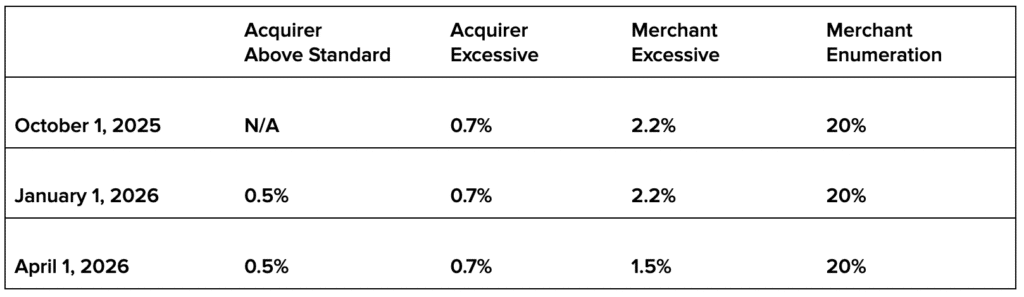
Merchants with fewer than 1,500 applicable fraud and dispute transactions per month are excluded from VAMP monitoring at the Visa level. And the enumeration ratio only applies to merchants with 300,000 or more confirmed enumerated transactions per month.
The only ratios that matter, effective April 1, 2026, are:
- Acquirer Above Standard — 0.5%
- Acquirer Excessive — 0.7%
- Merchant Excessive — 1.5%
- Merchant Enumeration — 20%
For merchants, the biggest change is the excessive ratio dropping to 1.5% from 2.2% in April 2026.
VAMP Fees
Fines assessed to merchants technically run through the acquirer first. Visa charges the acquiring bank, and they decide if and how to pass those costs to you.
Once enrolled in VAMP, fees apply to every applicable transaction (not just the ones over the threshold). There’s a three-month grace period for first-time identification within a rolling 12-month window.
After that, fees look like this:
- Acquirer Above Standard — $4 per fraud/dispute transaction
- Acquirer Excessive — $8 per fraud/dispute transaction
- Merchant Excessive — $8 per fraud/dispute transaction
How these fees appear on your statement is up to your processor.
The Acquirer Squeeze: Risks Most Merchants Don’t See Coming
Here’s where things get complicated for merchants who think their numbers look fine.
The new 1.5% merchant excessive ratio effective April 2026 sounds manageable. But the acquirer threshold is far stricter. For acquirers, 0.5% is considered above standard (where penalties start) and 0.7% is when those fees double.
Those thresholds apply across their entire merchant portfolio.
This means that technically, every single merchant using the same acquiring bank could have a VAMP ratio that’s well within Visa’s standards (say 1%). But this ratio would put that acquirer into excessive territory, meaning an $8 penalty for every fraudulent or disputed transaction.
The program is still so new that it’s hard to tell how processors will handle this. But we could start seeing:
- Stricter internal thresholds that acquirers will hold merchants to
- Higher reserve balances for high-risk accounts
- New fees and increased rates to account for potential penalties
Processors are not going to take these penalties on the chin. As always, they’re going to pass costs along to merchants to ensure profitability.
But this can potentially create a big problem for merchants doing nothing wrong. Even if your VAMP ratio is fine, your processor may still charge your account more if their total aggregate ratio is close to exceeding Visa’s thresholds.
What Merchants Should Do About This
First and foremost, focus on what you can control. Which means reducing fraudulent transactions and chargebacks to keep your VAMP ratio low:
- Use RDR to remove TC15 counts
- Use CE3.0 to remove both TC15 and TC40 from your ratio
- Put systems in place to identify enumeration attacks
Most merchants can see chargebacks but have limited access to TC40 fraud reports, which are filed by issuing banks. Ask your processor if they can give you this data. Because without it, you’re calculating your VAMP ratio blind.
You can’t control the VAMP ratio of other merchants using the same acquiring bank as you.
So instead, you just need to monitor your statements closely to see if any new fees pop up that could be related to these changes. Even if they aren’t clearly marked as a VAMP-related charge, processors may start inventing fees (it wouldn’t be the first time) to help them account for potential penalties down the road.