 by Matt Rej

If American Express bills you directly for credit card processing, it means you’re on an Amex Direct agreement. This structure is reserved for merchants processing over $3 million in Amex volume annually ($1 million prior to April 17, 2026) and certain MCC codes.
In this scenario, Amex runs a closed-loop network. Meaning it issues the card and acquires the transaction without a third-party payment processor sitting in the middle.
But Amex Direct reporting looks a lot different compared to traditional processor statements. If you’re looking for certain things on here that you’re used to seeing from your processor, you just won’t find them.
To help you understand what you’re looking at, I pulled a July 2026 statement from a hotel running over $700k per month on Amex Direct.
MFAS is the Amex Direct Version of a Monthly Processing Statement
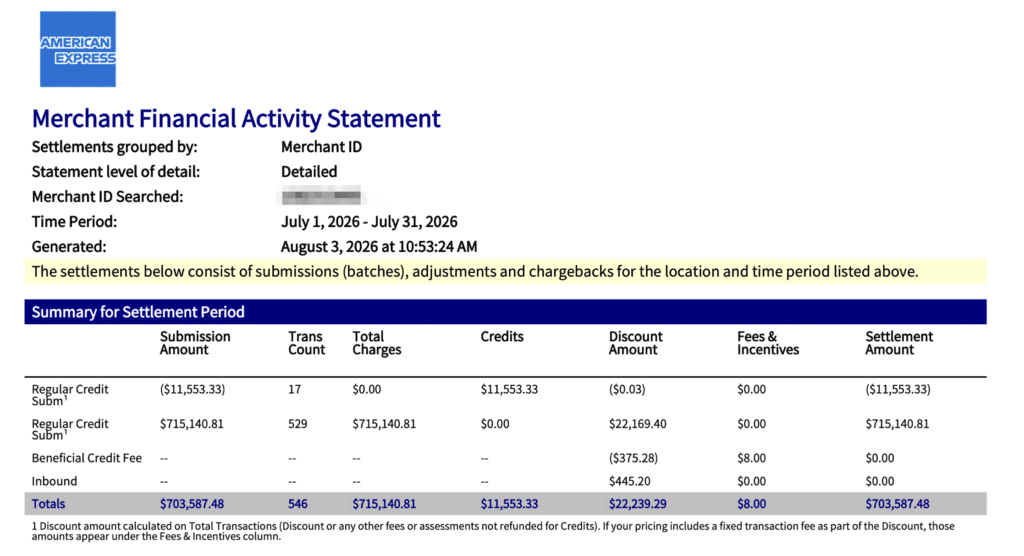
The first difference you need to understand is that your Amex Direct processing report is called a Merchant Financial Activity Statement (MFAS).
For your internal tracking and payment auditing, it serves the same purpose as a monthly merchant processing statement that comes from your payment processor. Just under a different name.
You can access this from your Amex merchant account by navigating to Payments > Statements & Reports.
From there, you have two download options:
- MFAS
- Chargebacks & Adjustments
You’ll select the MFAS for Amex’s default reconciliation format on your monthly volume. Raw data files and paper statements are available as alternatives.
Your Amex Discount Rate Isn’t on the Statement
Another glaring difference between your Amex Direct statement and a traditional merchant processing statement is that you won’t find your discount rate anywhere on here.
Other processors may not spell this out as cleanly as you’d prefer. But the percentage-based markup is almost always there somewhere. That’s not the case with Amex.
Why?
It’s by design. American Express doesn’t publish discount rates the same way as other processors.
As the network, issuer, and acquirer, all of the processing fees get paid directly to Amex. So the fee structure isn’t broken down cleanly into separate components and then charged a processor markup on top of it.
If you look at the fee tables in Amex’s Merchant Reference Guide, you’ll see that the discount amount “varies.” You need to contact your Amex rep to know your discount rate, which means the number lives in the direct agreement you signed with American Express.
Your Amex Direct discount rate isn’t listed on the MFAS, in other reporting, or anywhere else in the online portal.
So if nobody at your company can produce your signed pricing schedule from your direct agreement, it means you don’t know your rate and you can’t verify a single charge on your MFAS. Finding that rate schedule should be a priority before you do anything else.
How to Read the Summary for Settlement Period
The most important numbers on an Amex direct statement are in the top table on page one, called Summary for Settlement Period.
Everything else in the statement supports what’s in the summary.
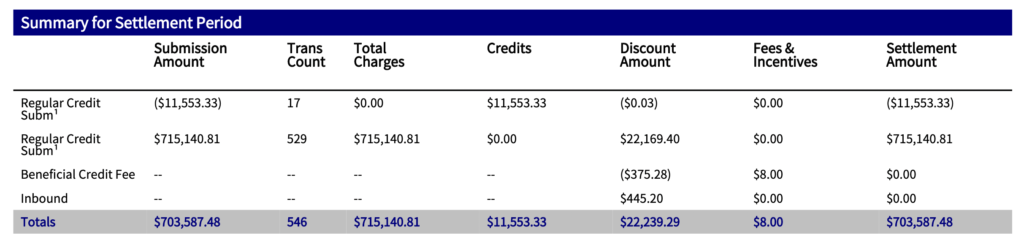
In this case, it’s just four rows and a total for each one. Let’s go line-by-line so you can understand what you’re looking at:
- Regular Credit (negative): These are your refunds. This merchant issued 17 credits totaling $11,533.33.
- Regular Credit (positive): Total sales. In this case, 529 charges totaling $715,14081 with $22,169.40 in discount taken.
- Beneficial Credit Fee: Discount amount in parentheses, means money is coming back to you. Plus an $8 charge in the fee column.
- Inbound: $445.20 in discount fees, with no offsetting volume shown.
Those last two rows have dashes across the Transaction Count, Total Charges, and Credit Columns.
So you just see the amount you’re being charged for without an explanation. But that gets covered in another part of the statement that we’ll get to shortly.
Calculate Your Amex Effective Rate
To find out how much it’s costing you to process American Express volume each month, you need to calculate your effective rate.
Take the Discount Amount total, add any Fees & Incentives, and divide that number by your net volume.
For this hotel property, it works out like this:
- Total cost: $22,239.29 + $8.00 = $22,247.29
- Net volume: $715,140.81 – $11,554.33 = $703,587.48
- Effective rate: $22,247.29 + $703,587.48 = 3.162%
Now you can work backward to find your contract rate. Just divide the discount taken on charges by volume:
$22,169.40 + $715,140.81 = 3.100%
You can spot check that number against any individual batches on the page.
So this property has a 3.10% flat-rate agreement, with a 3.162% effective rate this month. The gap is about 6.2 basis points which comes from other fees being charged. This is normal, and the difference here isn’t super concerning. But at this volume works out to roughly $5,200 in additional processing fees per year above the flat rate.
If your account has a major difference between your discount rate and effective rate, it warrants a closer examination.
What the Amex Direct Addendum Summary Actually Shows
At first glance, the Addendum Summary looks like a second set of processing activity. But it’s not.
This is what fills the dashes from the summary table above it.
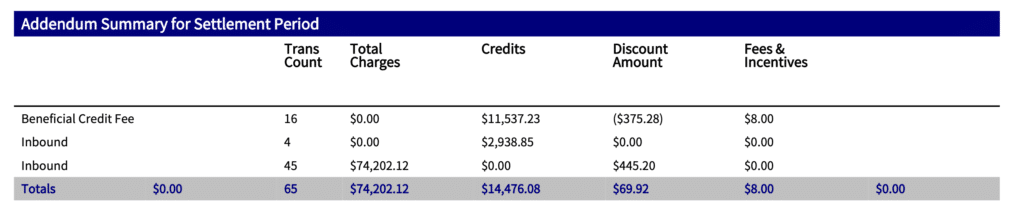
There’s three rows, and they map like this:
- Beneficial Credit Fee: $16 transactions, $11,537.23 credits — This represents the $375.28 refund and $8 fee
- Inbound: 45 transactions, $74,202.12 charges — Volume behind the $445.20 discount fee
- Inbound: 4 transactions, $2,938.85 credits — Informational only
Do not add up the Addendum totals.
That total line claims 65 transactions and $14,476.08 in credits. But the statement only had 17 credits totaling $11,553.33.
Why the discrepancy?
The four inbound credits are also counted in the 16 beneficial credits. So the total column here counts them twice.
One number that’s worth using in the Addendum is the $69.92 net discount.
That’s the $445.20 inbound charge minus the $375.28 credit refund. And it represents everything on the account that’s not part of the plain 3.10% flat rate.
What is the Beneficial Credit Fee on an Amex Direct Statement?
Here’s where things get interesting.
Amex’s default position on refunds is in section 4.7 of their Merchant Reference Guide. It says that when you issue a credit, Amex does not give back the discount or any fees that were already applied to the original charges.
This is the standard treatment, which would be the case with any payment processor and interchange fees that were paid to Visa or Mastercard on a transaction that was later refunded. Processing fees aren’t returned.
But the American Express Beneficial Credit program is an exception. If you’re enrolled in this as part of your direct agreement, Amex refunds the discount on qualifying credits and charges a per-credit fee instead.
We can look at the numbers on this statement to prove the mechanics:
- 3.10% of $11,537 in qualifying credits = $357.65
- 0.60% of $2,938.85 in inbound credits = $17.63
- Total is $375.28, which matches the statement amount to the penny
The $8 in fees comes from the 16 credits charged at $0.50 each.
Which means this property paid $8 to recover $375.28. Well worth it.
Now let’s run these numbers without the Beneficial Credit program applied so you can see the value. If the merchant was not enrolled, they would have paid $22,614.57 in fees (instead of $22,247.29), bringing their effective rate up to 3.214% (instead of 3.162%).
So the program is worth about ~5-6 basis points here.
If you’re running a hotel, restaurant, or any business with a meaningful refund rate and you don’t see the Beneficial Credit line on your MFAS, it’s worth bringing it up to your Amex representative.
Amex Direct Inbound Fee Explained
Inbound fees are charged on transactions where the card was issued outside of the United States. Depending on the country, it can be up to 1% of the face amount.
On this particular statement, it’s 0.60% ($445.20 ÷ $74,202.12).
The most important thing to understand is that this fee stacks on top of the discount rate instead of replacing it. So any card carrying this fee costs 3.70% (3.10% flat plus 0.60%).
This merchant’s Inbound line accounts for 6.3 of the 6.2 basis points separating the property’s contract rate from the effective rate. It slightly overshoots because the Beneficial Credit refund gives a fraction of it back.
But for many hotels, this number will be more impactful.
On this particular statement, only about 10% of the total volume ($74,202.12) were hit with the fee. Properties or other businesses with lots of international customers could be paying a lot more. And up to 1% instead of 0.60%.
Gross Pay vs. Net Pay Breakdown
American Express gives Direct agreement merchants two ways to pay processing fees:
- Net Pay — Amex pays out the settlement amount minus the discount amount and other fees.
- Gross Pay — Amex pays out the full settlement, and then a second adjustment pulls the fees out.
This particular property is on a Gross Pay agreement, which you can see clearly on this table titled Paid-in-Gross Debit Summary for Settlement Period.

If you’re on a net pay agreement, your table will say Paid-in-Net Debit Summary for Settlement Period.
This is an accounting preference, and it depends on what your bookkeeper or accounting software prefers to reconcile. But it’s worth noting that if you’re on a Gross Pay setup, like this merchant, the deposit summary looks like any fees aren’t being charged because all of the settlement amounts match the deposit amount.
But you’re still being charged. Those fees just come out separately.
How to Read the Settlement Detail Pages
One important callout for this section is that transactions from your previous month might be included here because American Express tracks this by the settlement date, not sales date.
This MFAS is for July 1, 2026 to July 31, 2026. But can see the first submissions (far left column) all range from 6/28 to 6/30:
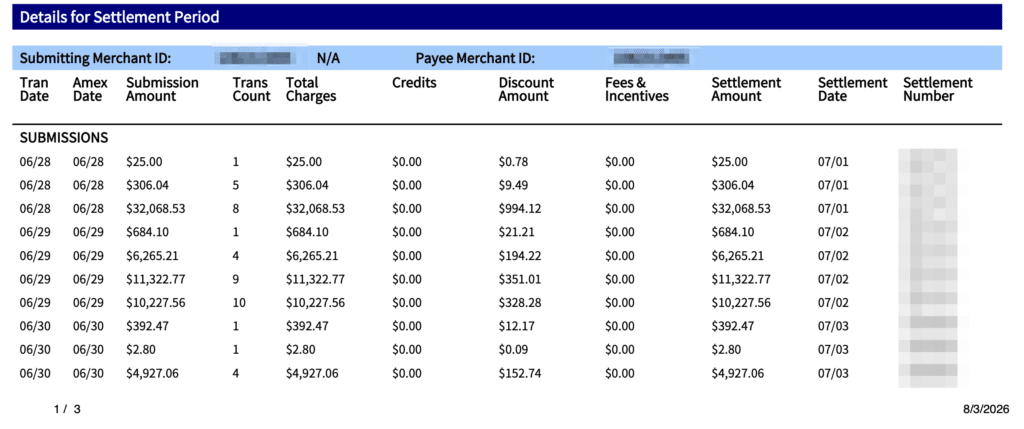
Now bring your attention to the Settlement date column to the far right, and you’ll see that all of those settled in July.
Other things worth paying attention to here:
- Total Charges vs. Submission Amount — These match on most rows. If they differ, the batch contains a credit.
- Fees & Incentives — Mostly zeros, with $0.50 and $1 charges scattered throughout. Each of these falls on a batch that contains a credit charged at $0.50 each.
- Discount Amount — If you divide this by the Total charges on any row, most come back at 3.10%. The ones that come back higher contain the inbound bee.
Four Numbers That Never Appear on the Statement
We just went through every section of the July MFAS for this merchant. And none of these numbers were printed anywhere on it:
- Base Discount Rate — 3.10%
- Inbound Fee (on top of discount) — 0.60%
- Beneficial Credit Fee — $0.50 per credit
- Effective Rate for the Month — 3.162%
What’s crazy about this is that all of these numbers answer the question: how much are you being charged by Amex on your direct agreement?
You need to do the math to find them. And every merchant will have a slightly different answer because it’s all customized.
What Happens If Numbers Aren’t Matching?
On this statement, everything is fairly clean and we’ve been able to account for everything by doing some math. Even though lots of the key percentage numbers don’t actually show up on the statement.
Though it’s worth mentioning that there’s a $0.03 Regular Credit in the Discount Amount column from the page one summary that is unaccounted for.
And honestly, I audited this statement in full and can’t seem to find it anywhere.
For $0.03, move on. Not worth any further investigation for a merchant doing over $8.5 million per year in Amex volume alone.
But this is a good habit to build because it means that you’re actually reconciling your statements instead of just reading them.
If you do find a major discrepancy, it’s worth a closer look and at minimum a phone call to Amex for an explanation. You can also have a merchant consultant review your statements to see if they can uncover a reason why things aren’t adding up.
How to Get More Detail Than the Statement Provides
If you’re looking for more insights than what the MFAS provides, there are two options:
Reports: Go to Payments > Statements & Reports, and then you can build custom reports by:
- Report Type
- Data Grouping
- Level of Information
- Format
- Location
- Date Range
If you go to the “Summary with Details” option and look at Settlement Dates, Transaction Dates, and Amex dates, most reconciliation questions can be resolved here.
Raw Data: Amex also offers raw data reconciliation files at three levels:
- Submission
- Transaction
- Transaction Pricing
For merchants running more than 100 transactions per day, this is the only place you’ll see pricing at the individual charge level.
But neither the Reports nor the Raw Data information will print your discount rate. You’ll still have to do the math to calculate it.
Merchants Have 90 Days to Report an Amex Direct Billing Error
Just like any payment processor, American Express can make mistakes when handling the backend acquiring of your direct agreement.
So if you spot an error or omission, don’t assume that it will just sort itself out eventually.
You have 90 days from the statement date to notify Amex in writing of any mistakes.
This window is shorter than most processor agreements. Which is why it’s so important to reconcile your statements every month as soon as possible.
How to Audit Your Amex Direct Account
You can apply the same approach that I used with this statement to audit your own Amex direct MFAS reports.
Here’s what you can do right now to get a better picture of where you stand:
- Pull your last three consecutive months of Amex MFAS.
- Calculate your effective rate for each month.
- Compare the effective rate to the rate in your Amex direct contract.
- Monitor the month-over-month trend on your effective rate.
From here, there are two red flags that warrant a closer inspection:
- If your effective rate is drastically different from the rate in your direct contract.
- If the monthly effective rate fluctuates significantly.
For the statement we just reviewed, there were no red flags. The effective rate difference was just 6 bps from the flat rate and was easy to explain when we crunched the numbers. This number was also in line with what this merchant pays on average.
But if you’re looking at a 3.12% effective rate in June that jumps to 3.65% in July, it should instantly raise alarms.
Same goes if you have a 2.91% contract rate but your effective rate is consistently around 3.2%.
Amex Direct pricing is negotiated, which also means it can be renegotiated. If you’re not sure whether you’re getting a fair rate on your Amex processing or you just want an extra set of eyes on your statement, we can help. Contact our team here at MCC for a free consultation.