 by Matt Rej


Fiserv’s merchant statements have gotten a facelift.
We’ve started seeing the redesigned statement format rolled out to accounts directly from Fiserv, as well as banks and ISOs utilizing Fiserv’s acquiring on the backend.
The new version is definitely cleaner, and visually, it’s much easier on the eyes. So this feels like an improvement at first glance.
But the new format still doesn’t make it easy for you to figure out how much you’re actually paying Fiserv.
- Both “Fees” and “Service Charges” contain a mixture of cost categories.
- So you need to go through each line item individually to determine whether the fee is a mandatory network charge or a Fiserv markup.
- The new “Fee Summary” doesn’t tell the full story, and can mislead merchants into thinking they’re paying less to Fiserv.
So despite the redesign and visual improvements, it’s the same old story here.
Fiserv has always been transparent in the sense that you can see exactly where every dollar is going if you know where to look. And that information is still on the new statements. But it’s not any easier to find.
New Bucket Labels Make it Hard to Separate Pricing
Let’s start with one of the biggest changes.
Fiserv’s new statements include a visual fee summary that divides monthly processing costs into three buckets:
- Fees
- IC/PF (Interchange & Program Fees)
- Service Charges
Here’s what that looks like on one of our client’s statements from July 2026:
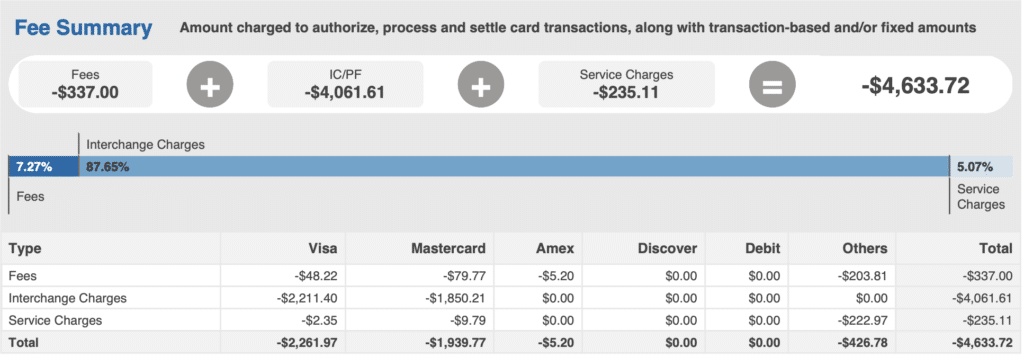
Most merchants will stop here and assume Fiserv’s cut falls into the “Service Charges” bucket.
But that’s not the case.
In fact, the IC/PF is the only category of the three that’s purely pass-through fees. Every dollar here either goes to the card networks or issuing banks. The other two buckets are mixed.
What’s Actually Inside “Service Charges”
As you continue through the new statement, you’ll see an itemized breakdown of every single fee charged to your account.
But the three categories from above (Fees, Interchange Charges, and Service Charges) are all jumbled together. So it’s not a clean transition from the summary to the actual breakdown.
What’s worse is that the “Service Charge” tag contains some network fees and some Fiserv markups. Here’s a snippet so you can see exactly what I mean:
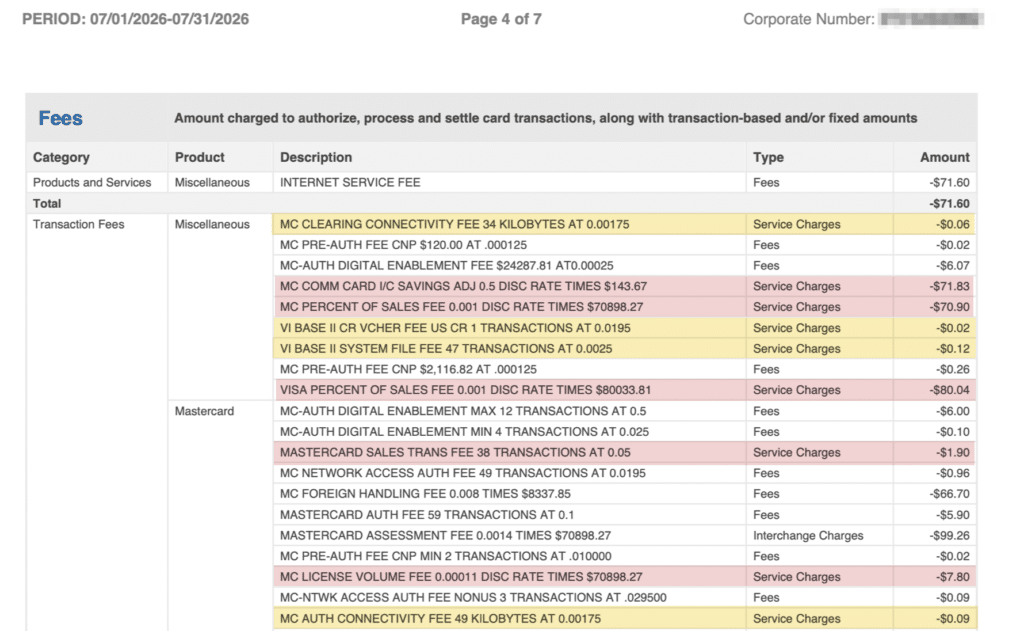
Everything highlighted in yellow is a network fee, while everything in red goes straight to Fiserv.
I know this because I’ve been auditing merchant statements for a decade, and I can quickly spot the differences based on the fee names and rates. But the average merchant isn’t going to be able to pick these out.
Of the 9 service fees in the screenshot above: 4 are network fees, and 5 are Fiserv fees.
The same pattern continues throughout this statement.
There’s no single number or total category that represents how much money is being paid to Fiserv.
Same Applies to the “Fees” Tag
Anything marked as “Fees” is also a mixed bag. Here’s a snippet showing some transaction-based “Fees” run through Visa on the new Fiserv statement:
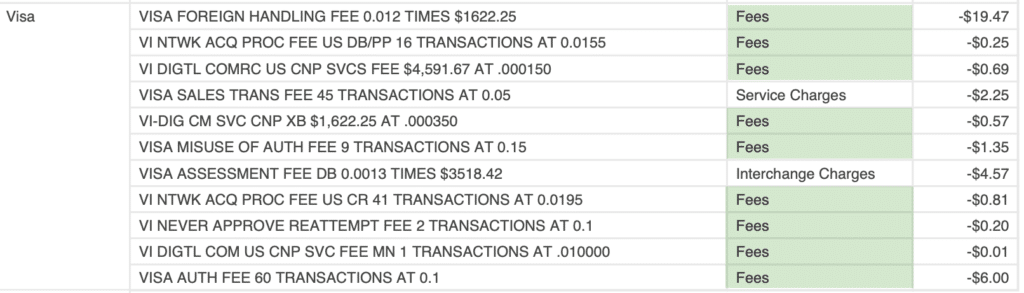
You’ll see some mandatory network fees in here:
- Acquirer Processing Fee
- Digital Commerce Service Fee
- Digital Commerce Service Cross-Border
- Misuse of Authorization Fee
- Visa Never Approve Fee
Along with some Fiserv markups in the same category:
- Sales Transaction Fee
- Foreign Handling Fee
- Authorization Fee
In addition to the Fiserv markups seen in this particular screenshot, there are others throughout this statement, including: Internet Service Fees, Commercial Card Adjustments, and Authorization Fees for Amex and Mastercard.
The cleanest single example is Mastercard’s Network Access Auth Fee (a mandatory network fee) and Mastercard Auth Fee (a Fiserv markup) are both labeled “Fee” within two lines of each other:

If you don’t have a background in payment processing, how are you supposed to know the difference?
Fiserv is hoping you don’t.
Why This is a Problem
The biggest issue with Fiserv’s new statement format is that you can’t easily figure out how much money you’re paying to Fiserv.
And that’s something you should know.
By mixing mandatory network fees and negotiable Fiserv fees together across two different fee categories, it obscures Fiserv’s markup on your merchant account.
You’re left to assume that whatever the headline rate you agreed to pay is what you’re being charged. When in reality, there are several other fees in there that increase your total processor effective rate.
There’s really no other industry that operates like this. Think about all of the other vendors you use for your business. If you pull out an invoice, you can tell exactly how much you’re being charged by them (because that’s how it should be).
Not here.
Fiserv redesigned its statements but didn’t fix a core problem that existed before.
I think the new statements definitely look nicer. But I’d rather take the older, uglier version if it had Fiserv’s fees separated into its own category.
And I’m truly not trying to pick on Fiserv here. Lots of processors do this. It was just a little disappointing to see a redesign that didn’t address what every merchant should have the right to know: how much they’re actually paying directly to their processor.
I have a separate post showing an example of a transparent statement that actually separates processor markups into its own category. It’s honestly rare to see, but check it out so you can see how clean it looks and how helpful it would be to have this information on every statement.
Other Changes to Fiserv’s New Statements Worth Knowing About
The way that Fiserv is now categorizing your fees is the most important takeaway from the new statement design.
But there are some other changes I want to quickly call out as well.
You have 13 month sales trends and year-over-year sales data (old statements just had month-over-month). This is fine, and makes it seem merchant-focused but it’s nothing groundbreaking.
Something more important to flag is that Fiserv changed its markup terminology:
- We used to see “Sales Discount” used on old statements for Fiserv’s markup per transaction
- New statements now use “Percent of Sales Fee” for this charge
This translates to:
- Visa Sales Discount → Visa Percent of Sales Fee
- Mastercard Sales Discount → Mastercard Percent of Sales Fee
- Discover Sales Discount → Discover Percent of Sales Fee
- Amex Sales Discount → Amex Percent of Sales Fee
It’s subtle and not a big deal, but definitely worth understanding if you’re searching for your old discount rate line items on here and can’t find it.
Your rate should remain the same on the new statements, regardless of what it’s being called.
Final Thoughts
Fiserv’s new statements are a genuine improvement. But only because they look cleaner visually.
You still have to dig for the most important information and manually calculate the total you’re paying to Fiserv. And the only way to do that is by going through each line item individually.
So when you’re reading your new Fiserv statements, skip the Fee Summary at the top. That doesn’t tell you what you need to know.
Go straight to the breakdown and pull out Fiserv’s charges there, mixed in with all of the network fees.
For those of you who don’t have time for this or can’t figure out which fees are mandatory vs. negotiable processor markups, we can help. Our team can analyze your Fiserv statements for free, help you fully understand exactly what you’re paying, and identify any savings opportunities.
If we find opportunities to save money, we’ll negotiate directly with Fiserv on your behalf. No switching.