 by Matt Rej

Lightspeed doubles as point-of-sale (POS) software and a payment processor. But it’s unique compared to other similar all-in-one systems on the market because you have the option to bring your own processor (for an extra fee).
It’s a good fit for certain types of businesses operating at a lower volume, especially if you have lots of in-person credit card sales.
So whether you’re currently using Lightspeed and assessing your costs or you’re evaluating it for the first time, this guide can help you make the right decision for your business.
Our Insider Take on Lightspeed POS
We have a lot of clients using Lightspeed in different ways. Some strictly use the POS but rely on a third-party processor, while others get their software and processing directly from Lightspeed.
Seeing how this works from multiple angles gives us a unique perspective into how Lightspeed operates and how these different setups impact your total processing costs.
Here’s the short version:
- Lightspeed Payments is a flat-rate processing solution baked into the POS.
- It’s easy to understand, cheaper than other flat-rate providers, but still not as transparent as interchange-plus pricing.
- Costs are inflated because Lightspeed Payments operates at a PayFac (payment facilitator).
- They rely on sub-processors to process payments on the backend, and your rate is set high enough to ensure everyone earns a profit.
- You can use Lightspeed POS with your own processor (instead of Lightspeed Payments), but you’ll pay a monthly fee based on your volume.
Overall, Lightspeed is a decent POS. And compared to other flat-rate providers on the market, the rates are reasonable. But you’re likely overpaying if a large portion of your transaction volume comes from in-person debit cards or basic consumer credit cards.
The monthly transaction fee for using a third-party provider isn’t outrageous. But it’s definitely high enough to discourage you from using another processor, as it can add a meaningful increase to your effective rate depending on what tier you fall into.
Lightspeed Payment Processing Rates
Lightspeed Payments uses a flat-rate processing model:
- Card-Present: 2.6% + $0.10 per transaction
- Card-Not-Present (online, keyed, phone): 2.9% + $0.30 per transaction
Unlike other flat-rate providers on the market, Lightspeed Payments generally does not offer interchange-plus pricing at all — even to high-volume merchants.
There are plenty of other similar solutions out there that push flat-rate first. But they’ll typically negotiate IC+ at a certain volume. So it’s unfortunate that Lightspeed Payments doesn’t do that at all.
This is likely due to Lightspeed’s setup. Technically, they’re a PayFac (payment facilitator) and not an actual processor. In simple terms, this means that they rely on third-party processors to handle payments on the backend. Here’s how it works:
- You enter into an agreement with Lightspeed Payments.
- Lightspeed routes transactions through sub-processors: Adyen, Cayan (TSYS), ProPay, and Stripe.
- You don’t have any relationship or direct point of contact with the backend processor (everything goes through Lightspeed).
- The flat rate covers interchange to the issuing banks, assessment fees to the card networks, markup to the sub-processor, and markup to Lightspeed.
For in-person transactions, 2.6% + $0.10 honestly isn’t terrible, especially if a lot of your customers pay with rewards credit cards that carry a higher interchange rate. But if a solid portion of your card mix comes from in-person debit cards, the markup here is massive.
Regulated debit cards are capped at 0.05% + $0.22 at the interchange level. On a $100 sale, that’s $0.27 in interchange, but Lightspeed’s flat rate charges you $2.70. That’s 10x the underlying transaction cost, and it’s pure profit split between Lightspeed and the sub-processor.
Using Your Own Processor vs. Lightspeed Payments
By default, Lightspeed Payments handles your credit card processing for Lightspeed POS. But if you don’t want a flat-rate structure or you already have another provider, you do have the option to use your own payment processor.
Unfortunately, this path is going to come with extra fees that may offset any potential savings.
Per Lightspeed’s Service Agreement, you’ll pay a Monthly Transaction Fee for using a third-party processor. And the fee is tiered based on your monthly transaction volume:
- $5,000 to $34,999 – $200 per month
- $35,000 to $99,999 – $400 per month
- $100,000 to $124,999 – $560 per month
- $125,000 to $149,999 – $680 per month
- $150,000 to $174,999 – $810 per month
- $175,000 to $199,999 – $930 per month
- $200,000 to $249,999 – $1,120 per month
- $250,000+ customized by your account manager
It’s also worth noting that restaurants using Lightspeed’s Restaurant U-Series (former Upserve platform) pay a separate $99 per month gateway fee for using a third-party provider.
The key thing to understand here is how these monthly fees impact your effective rate. For example, a merchant doing $120k per month in card volume pays a $560 fee, which adds roughly 0.47% to their cost of acceptance before their actual processor’s rate gets factored in.
At the lower tiers, the percentage is even higher relative to volume. So the math on “bring your own processor” rarely makes sense with Lightspeed unless the processor is dramatically cheaper. And that’s exactly the outcome that Lightspeed wants.
The only scenario where this really makes sense if you’re above $250k and can get a customized rate that drops. For example, a $500 fee on $350k per month is ~14 basis points, which is something you can live with if your current processor legitimately offers cheap IC+ pricing.
But that’s obviously contingent on Lightspeed agreeing to those terms and breaking the cycle of raising the fee as your volume increases.
Software Plans and Other Costs to Factor In
The processing rate per transaction isn’t the only cost you’ll pay to use Lightspeed. The POS is a subscription platform, so you’re also paying for the software.
Retail plans start at $89 per month and go as high as $289 per month, plus additional fees for adding locations and registers. You’ve also got hardware costs for terminals, iPads, printers, cash drawers, and optional add-ons with onboarding costs depending on the plan you select.
The takeaway here is that the advertised price is just the floor.
So if you’re comparing Lightspeed to another POS or processor just on the rate per transaction, it can look cheaper than it actually is. You need to factor in the total cost based on your actual needs. And once you add in the software, hardware, etc., your effective rate will likely climb well above 3%, which makes the 2.6% + $0.10 rate less appealing.
What a Lightspeed Statement Actually Tells You (and What It Hides)
To show you what all of this looks like in the real world, here’s an actual Lightspeed Payments statement from one of our clients:
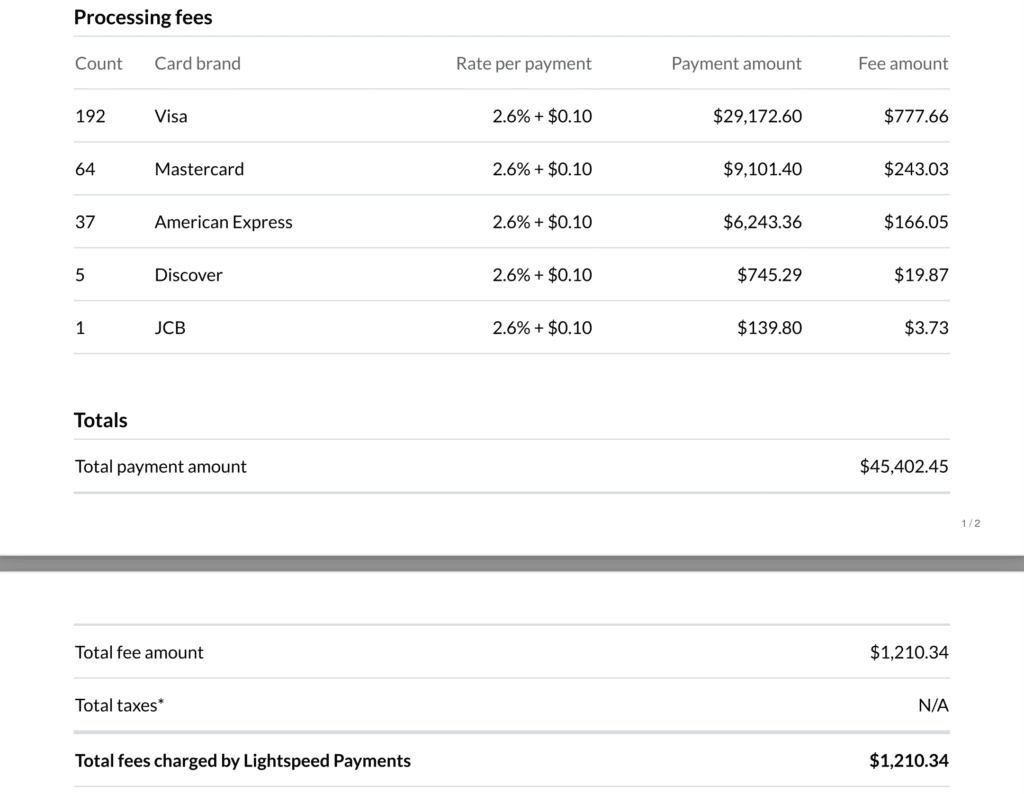
It’s remarkably simple. At just two pages total and a handful of line items, it’s one of the most straightforward statements you’ll find in the entire payment processing industry. Anyone can read this in 30 seconds and feel like they understand their costs.
But flat-rate statements like this hide the part that really matters. Nowhere on here do you see the interchange rate that Lightspeed paid to the card brands or what they paid the backend processor.
This merchant paid $1,210 in processing fees on $45,402 in volume, resulting in an effective rate of roughly 2.67%. Is that rate reasonable? Maybe. But it’s impossible to tell without the full interchange breakdown.
Clean statements like this feel reassuring because you can understand everything. But it’s not the same as getting a good deal, and it’s not doing you any favors.
Contract Terms to Watch Out For
Beyond the PayFac/sub-processor arrangement and extra fees for using a third-party processor, there are some additional clauses in Lightspeed’s service agreement that deserve attention before you sign anything.
Hardware Commitment — If you accept discounted or free hardware from Lightspeed, you’re locked into a 24-month contract that requires you to:
- Keep using Lightspeed POS
- Start processing with Lightspeed Payments within 30 days
- Maintain a minimum daily average of processing volume over those two years
So the “free” hardware isn’t actually free. Lightspeed knows they’ll easily make up the cost of your terminals on your processing fees. And to guarantee it, they’re imposing minimum processing volumes to ensure they get paid.
Early Termination — Lightspeed will charge you an early termination if you cancel before your term is up. This fee includes:
- Any unpaid non-recurring fees
- Recurring fees you would have owed for the rest of the term
- The difference between the list price and any discount you got on hardware or software
In plain English, this means you’re going to pay a chunk of cash before you can just walk away from Lightspeed. Lightspeed doesn’t typically impose liquidated damages, which is good to know. But the way this is worded you could still owe thousands to cancel.
While none of this is unusual for the industry, it’s still worth understanding ahead of time because it’s not like you can just “sign up now and cancel later if you’re not happy.” You need to know the term length, renewal terms, and what you’re actually committing to before you sign anything.
Final Thoughts
Lightspeed is a capable POS, and for the right business, it can definitely make sense to run your payments through them.
If you run mostly in-person sales and accept a high volume of rewards credit cards, there’s some value in having hardware, software, and processing under one roof. The 2.6% + $0.10 fee, while not cheap, isn’t too bad. You’re paying for convenience.
But Lightspeed doesn’t make sense for every card volume and card mix. And while they allow you to use your own processor, the extra fees hardly make this worth it.
This is where it can help to work with a merchant consultant like our team here at MCC. We can audit your statements to determine if you’re actually getting a fair rate, and then negotiate those terms directly with Lightspeed or your current processor.
So before you get a new POS system or attempt to switch processors, contact us first. We’ll help you save money without changing anything.