 by Matt Rej


RealGreen is a popular platform for lawn care and landscaping businesses. It supports everything from scheduling to routing, customer management, and invoicing, all the way through payment collection.
But if you’re using RealGreen to accept credit card payments, you don’t have many options for integrated processing.
WorkWave Payments is the exclusive integrated payment processing solution for RealGreen. And while WorkWave generally pushes flat-rate pricing, that doesn’t mean every business using RealGreen’s software pays the same rates.
I’ve got real customer statements and insider insights that can help you out as you’re navigating the credit card processing side of this software.
How Payment Processing Works With RealGreen
RealGreen is owned by WorkWave (acquired in 2021). As a result, RealGreen uses WorkWave Payments as its sole integrated payment processing solution.
The integration is not mandatory, meaning you can still use RealGreen software for the operational side of your lawn care business (scheduling, CRM, routing, etc.), and then use a standalone payment processor outside of the software.
That’s typically the best option if you’re set up for payment processing elsewhere and already have a merchant account with another provider.
But the integration option is definitely convenient, especially if you’re dealing with thousands of payments per month. As you can manage billing and payments under one roof.
If you do decide to use WorkWave as your payment processor, it’s worth understanding that the platform operates under a payment facilitator (PayFac) model, with Worldpay and Adyen identified in its underlying processor agreements.
I’ve already covered these relationships extensively in our WorkWave Payments integrated processing review, so I won’t repeat everything here.
Instead, let’s focus on what RealGreen users are actually paying and how you can use this information as leverage on your own account.
RealGreen Credit Card Processing Rates and Fees
WorkWave generally promotes flat-rate credit card processing, meaning merchants pay a fixed percentage regardless of the card type being processed.
But no universal pricing is published anywhere for RealGreen customers. And according to its own payment processing FAQ, rates are based on the merchant’s credit card processing volume.
I can back up that statement based on the statements I’ve personally seen from our clients here at Merchant Cost Consulting. WorkWave’s pricing for RealGreen users can vary considerably. And volume is definitely a factor.
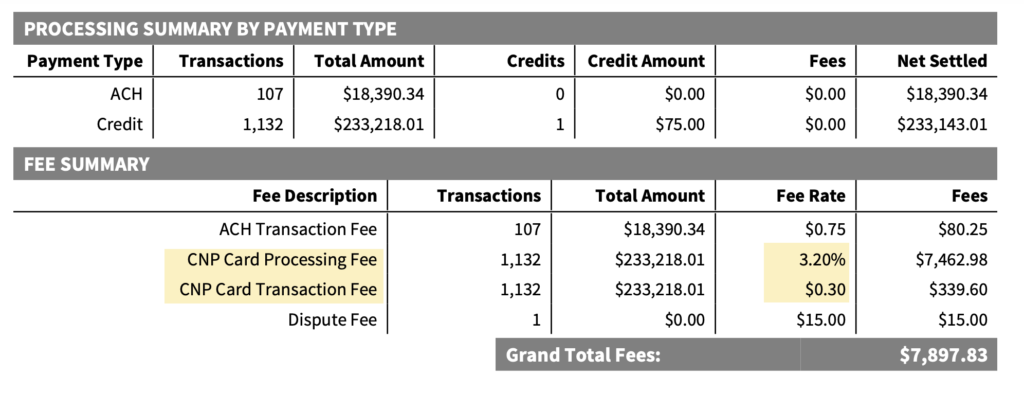
For example, here’s a flat-rate statement showing a 3.20% + $0.30 rate for card-not-present transactions:
But we’ve also seen RealGreen accounts on interchange-plus pricing agreements, which is a much better setup and cheaper overall.
This merchant is paying a 0.42% markup on CNP transactions:
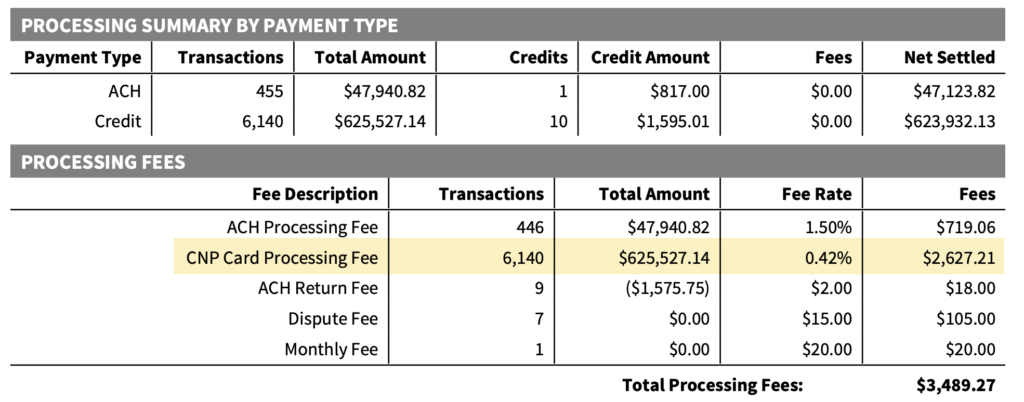
That’s a reasonable rate for an integrated setup like this, especially considering the fact that WorkWave isn’t charging any junk fees or hidden markups anywhere else.
Though the pricing isn’t perfect (more on that shortly).
Flat-Rate vs. Interchange Plus
Interchange-plus is always going to be cheaper than the flat-rate model, and these two statement examples prove it.
If we look at the effective rate (total credit card processing fees divided by total credit card volume), the difference becomes much clearer.
The first merchant paid $7,897 in processing fees on $251,608 in volume. That works out to an effective rate of 3.14%.
Now compare that to the second merchant with interchange-plus pricing.
This business processed $671,892 with $17,151 in fees. That number includes interchange fees, network assessments, WorkWave’s markup, and other charges.
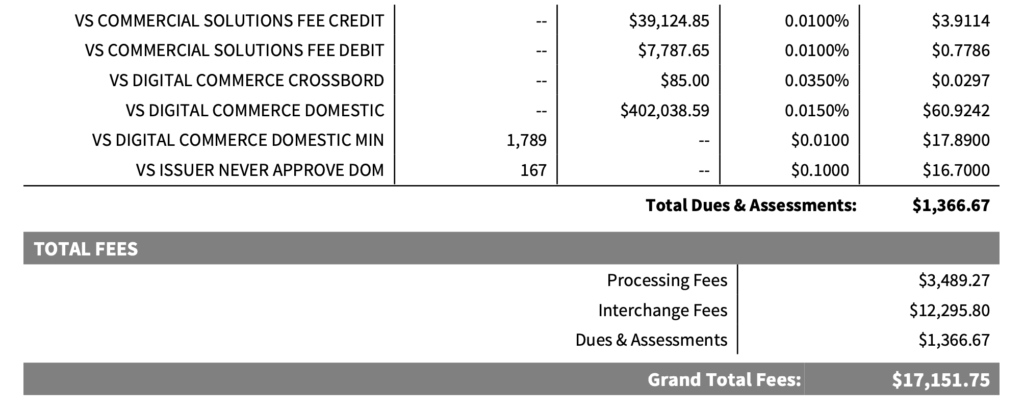
Their effective rate is just 2.55%.
That’s a difference of 59 basis points (0.59%) in overall processing costs compared to the flat-rate account, which is significant.
But if we eliminate the ACH volume and fees from both statements, focusing exclusively on card transactions, the difference is even greater:
- Flat Rate Merchant: 3.35% effective credit card processing rate
- IC+ Merchant: 2.62% effective credit card processing rate
Now the difference between the two is 73 basis points.
Which works out to roughly $73,000 saved on every $1 million processed. That’s real money, just for being on a different pricing model.
RealGreen ACH Processing Fees
Another interesting difference between these two statements is how much each merchant pays to accept ACH payments.
- Flat-rate merchant pays just $0.75 per ACH transaction
- IC+ account pays 1.50% uncapped
Immediately, we can see that a concession was made on both accounts.
Since the flat-rate account is paying more to accept credit cards, RealGreen was willing to give them a better deal on ACH transfers. And part of getting a competitive IC+ rate for the other account meant sacrificing the ACH rate (1.50% is very high).
For businesses relying on a lot of ACH transfers from their customers, this is definitely worth your attention as the difference between $0.75 vs. 1.50% can easily translate to thousands of dollars in either fees saved or paid depending on where you land.
It’s also a good reminder that a single rate on your statement doesn’t define whether you’re getting a fair deal. You need to look at the total costs based on your payment mix.
Can You Use Another Payment Processor With RealGreen?
Yes, but it won’t be integrated. That’s the distinction that you need to understand.
WorkWave Payments is the only fully integrated processing option for RealGreen. And no outside payment processors or gateways are supported.
But you can still process your payments through a separate merchant account, and then just reconcile everything after.
This is actually a good negotiation lever to discuss with your current processor, as it can help you save money there as opposed to switching your setup.
Tell them you’re interested in switching to WorkWave Payments because they integrate with RealGreen, and you know they’re unable to support this. But you’d consider staying if they offer you a better rate.
Trust me, they want to keep your account. And even if it’s an empty threat, it’s worth trying.
Direct acquirers can also beat an IC+ rate of 0.42% by a mile. So if your markup is say around 10-20 bps, those savings likely outweigh the convenience of an integrated setup. And the lower cost is definitely worth it if you’re only able to get on a flat-rate setup.
How to Negotiate Lower Rates With RealGreen
For those of you who are already set up with WorkWave Payments via RealGreen, your rate isn’t set in stone. Here’s how you can save money on payment processing while keeping everything in place.
Start with your pricing structure: Despite what your rep at RealGreen tells you, interchange-plus pricing is available and you now have proof to back it up. Switching from a flat-rate model to IC+ can be the single biggest way to save money on RealGreen integrated processing for most businesses.
Then focus on the processor markup: Once you’re officially on interchange-plus, it’s about getting a fair rate. We already know that RealGreen/WorkWave is willing to offer rates around 40 bps for a merchant doing roughly $670k per month. So you can use that as a baseline based on your volume. And the rate should get better as your volume goes up.
Look at any additional fees being applied: We honestly don’t find any junk fees on RealGreen processing statements via WorkWave. But that’s not to say they don’t exist. Aside from your rate on card transactions, the ACH charge is going to be the next most important. Try to negotiate a low fixed amount as opposed to a percentage-based fee on ACH payments.
Push back on recent rate increases: WorkWave’s latest processing rate increase went into effect on June 1, 2026 and it included RealGreen customers. Make sure you understand how that change affected your account, and you don’t necessarily have to accept it blindly. You can push back to either keep your current rate or meet somewhere in the middle.
If you’re using RealGreen and WorkWave Payments but struggling to get a better deal, we can help.
Our team can review your statements, identify areas where you’re overpaying, and then work directly with WorkWave to ensure your rate is fair. No changing software and no disruptions to your existing payment processing setup.
Saving money doesn’t usually involve changing processors. It’s just about making sure you’re getting the best available pricing on the platform you’re already using.