 by Matt Rej


Trying to make sense of your monthly credit card processing statements can be tough for the average business owner.
Worldpay’s merchant statements typically have dozens of different line items across multiple pages, and they’re filled with abbreviated industry terms that don’t always translate well into plain English.
While you can quickly scan the fees and totals, it’s important to read each line to determine what you’re actually paying for. The goal is to identify which fees are legitimate pass-through fees and which ones are processor markups.
From there, you can negotiate directly with Worldpay to lower your rates and potentially get some extra fees removed from your statements.
Full Worldpay Statement Audit
I’ve pulled up a real Worldpay statement from our clients here at MCC (with their information redacted of course).
Let’s go through each section to see what exactly you’re looking at and what’s most important.
The Deposit Summary is Fairly Straightforward
Worldpay merchant statements always begin with a summary of deposits. Any day where there’s a sale, chargeback, or deposit activity will have its own line item:
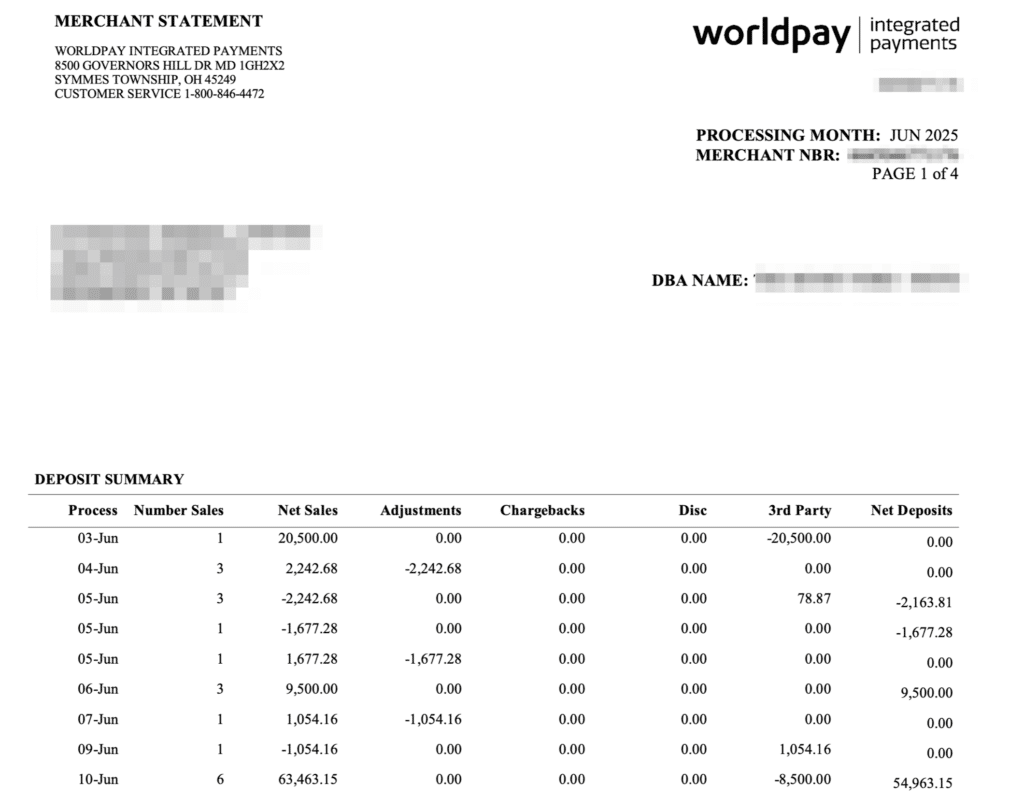
This particular business does high-ticket sales at a lower volume. As you can see, there was only a single transaction on June 3rd for $20,500. June 10th had 6 sales for $63,463.
If you look closely, you’ll see that the Net Sales column doesn’t always align with the Net Deposits column.
That’s because anything in the Adjustments, Chargebacks, and 3rd Party columns get subtracted from the sales total.
In this case, there were three adjustments (June 4th, 5th, and 7th). Those adjustments were from “batch reviews” (shown on the next page):

These are isolated incidents that could be triggered for any variety of issues.
But if you have anything in your Adjustments column on your Worldpay statement and you don’t know what it’s coming from, just look at the next page and you’ll see the reason.
Same goes for the 3rd Party column. If we look at the next page, we can see that the third party here is American Express:
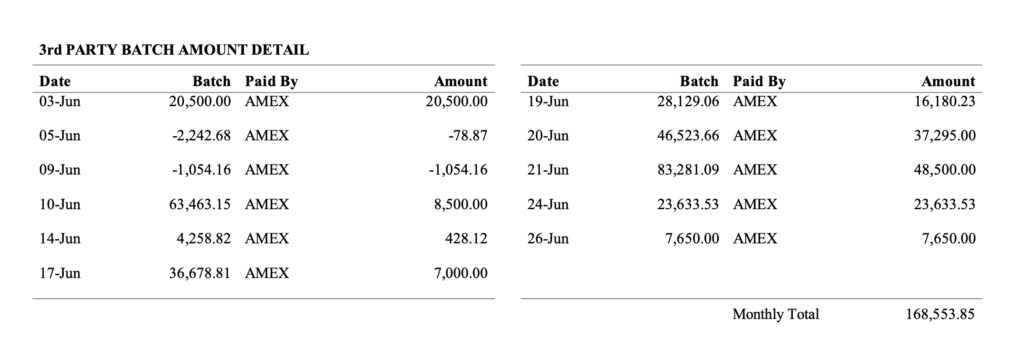
This merchant has a direct agreement with American Express because they process over $1 million annually in Amex transactions.
You’ll obviously still get the money. But technically Amex is your acquiring bank in this scenario (not Worldpay). So Amex will pay you directly, and the deposits won’t be itemized as though they’re coming from Worldpay (because they’re not).
I intentionally chose this statement because it shows some of the subtle nuances that aren’t always super easy to understand.
If you don’t have any adjustments, chargebacks, or third-party acquirers in the mix, then your net sales will match your net deposits for each day.
Processing Activity Summary Shows Markups Paid Directly to Worldpay
This is one of the most important parts of your Worldpay statement because it shows exactly how much Worldpay is charging you per transaction.
The activity is itemized by card type, but you need to focus your attention on the three columns to the far right:
- Settled Per Item: Fixed dollar amount per transaction
- Discount Rate: Percentage paid per transaction
- Processing Fees: Total paid directly to Worldpay
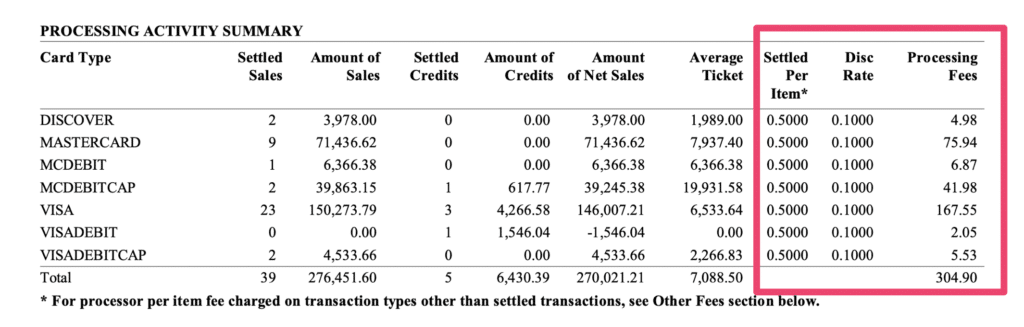
In this case, the merchant is paying Worldpay 0.10% + $0.50 per transaction on all card types.
0.10% of the transaction amount honestly isn’t bad. The $0.50 fee is high (we normally see this closer to $0.05 or $0.10). But since they don’t process a high volume of transactions it’s pretty marginal overall.
In total, they paid $304.90 to Worldpay on $270,021 in net sales.
This number excludes Amex, and there are additional fees coming from Worldpay later on. But it’s still the most important part because it applies to every transaction.
So if you got a notification that your Worldpay discount rate is increasing by 0.10%, then they’d be effectively doubling your rates in this scenario. Anytime the number in your discount rate column changes from one month to next it’s something you need to get control of ASAP.
Interchange Fees Come Directly From the Card Networks
Worldpay also summarizes all of the interchange fees at the network level. Each time you accept a card, there is an interchange qualification determined based on factors like the brand, card type, transaction amount, transaction environment, and more.
Here’s what that looks like:
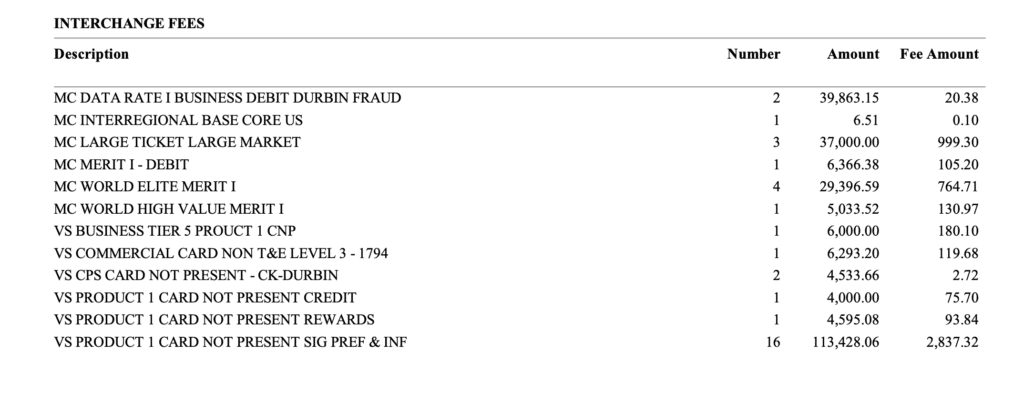
It’s easy to double-check these rates because so many have just one transaction per interchange qualification.
For example, we can see that an MC Merit I – Debit card was charged$6,366.38 for a total of $105.20. If you compare that to Mastercard’s interchange qualification matrix, you’ll see that the rate is 1.65% + $0.15 per transaction (so the math checks out).
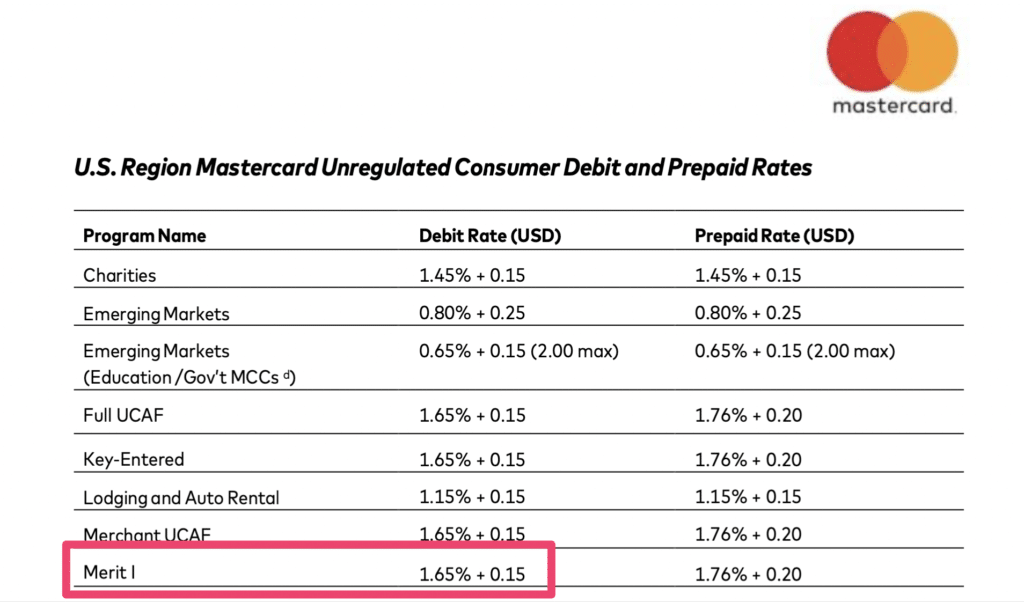
You can spot check some of these on your own just to verify their accuracy.
If there’s a discrepancy between what you’re being charged by Worldpay and what the card network is charging you it means there’s a bigger problem that needs to be investigated.
But for the most part, Worldpay should be passing through these wholesale rates to you at no additional cost.
The Other Fees Breakdown Shows a Mix of Network Assessments AND Processor Fees
Here’s where things get a little more interesting and require more attention.
Worldpay’s itemized list of Other Fees contains legitimate pass-through fees from the card networks (Visa, Mastercard, etc.), AND more markups for Worldpay.
The difference here is that the network assessments are mandatory, while the Worldpay markups are negotiable. So you need to identify the Worldpay fees and figure out if they’re tied to a specific service or if they can be removed altogether.
Here’s what I mean:
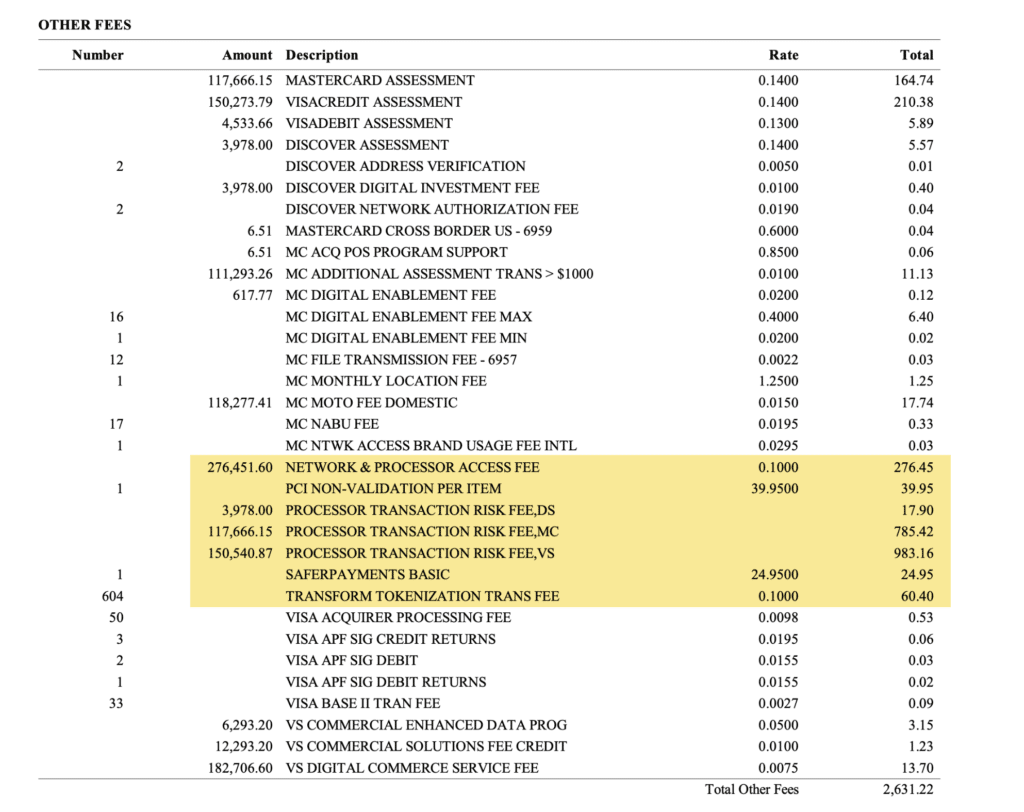
Everything highlighted in yellow is coming directly from Worldpay:
- Network & Processor Access Fee: 0.10% on the full $276,451 processed this statement
- PCI Non-Validation Per Item: $39.95 per month
- Processor Transaction Risk Fees: Separate “risk” fees itemized by card network
- SafePayments Basic Fee: Another risk management/safety service provided by Worldpay charged at $24.95 per month
- Transform Tokenization Transaction Fee: 0.10% for turning sensitive card data into tokens for secure processing
If you add all of these up, that’s an additional $2,188.23 in fees being paid to Worldpay.
Everything else is coming directly from the card networks. And when we look at the Total Fees breakdown, we see $2,631.22 in Other Fees.
This means that just 17% of those extra charges are pass-through fees from the card networks.
The rest is going straight to Worldpay.
It’s easy to overlook this when you’re just glancing at your statements and see a list of charges that look like.
Now Look at the Total Breakdown and Do Some Quick Math
The last page of your Worldpay statement contains a quick summary of all the charges we’ve looked at so far:

But this is somewhat misleading.
Worldpay is saying that this merchant paid $304.90 in processing fees, which is correct and something we verified earlier. But this is just what they’re charging as a per-transaction markup.
In reality, a large component of that Other Fees figure is also Worldpay’s markup.
A more accurate breakdown would look like this:
- Processing Fees: $304.90
- Interchange Fees: $5,793.41
- Additional Worldpay Fees: $2,631.22**
- Assessment Fees: $442.99
By lumping network assessments with additional markups in the “Other” category, Worldpay is forcing you to do some math here.
This merchant’s effective rate for this month is actually 3.15%.
I got this by dividing Total Fees ($8,729.53) by Total Volume ($276,451.60).
Paying 0.10% + $0.50 per transaction doesn’t seem like such a great deal anymore when your processing costs exceed the 3% threshold.
In reality, Worldpay collected $2,936.12 in processor fees. If we divide that by the total volume, we can find that Worldpay is actually charging this business 1.06% in total fees.
Why This is So Important For Worldpay Merchants to Understand
I know what some of you are thinking. So what? Regardless of what the statement says, I’m still being charged the same amount.
The problem is that glancing quickly at your statements can create a false sense of trust with your processor.
I’m not saying Worldpay is doing anything wrong here. They’re actually being very transparent with each and every fee. But the way it’s being presented can be misleading if you’re just looking at the summaries.
- It would be easy to look at this statement and think you only paid $304.90 in processing fees.
- But in reality, it was closer to 10x that amount ($2,936.12).
- Your contract might say your rate is 0.10% + $0.50 per transaction (which is true).
- But when you factor in ALL of Worldpay’s fees, you’re actually paying them over 1% in processor markups.
And here’s the most important takeaway: all of your processor markups are negotiable.
You can contact Worldpay and tell them to get rid of those various Processor Transaction Risk Fees. You’re already paying a monthly PCI Fee and SafePayments service fees (which could potentially be eliminated as well).
The other thing here is that Worldpay’s fees aren’t necessarily consistent from one merchant to another.
Your account might be getting charged an additional 0.35% instead of 0.10% for “access to the card networks.” (You shouldn’t be paying your processor for giving you access to the card networks. That’s the whole point of the service they’re providing you).
Final Thoughts and Next Steps
Take out your most recent Worldpay statement and go through each section following the same approach I took above.
It may take you 15 minutes instead of 15 seconds, but those extra minutes can identify thousands of dollars in charges you weren’t aware of before.
Get into the habit of doing this every month, and make note of your effective rate. You should also calculate the rate you’re paying to Worldpay in markups every month to see if it’s increasing over time.
While your rate per transaction might not change, your effective rate and markup rate rising is a sign that other fees are being added to your Worldpay statements.
And if you’re still struggling to determine which fees are legit and which ones can be negotiated, contact our team here at MCC for a free Worldpay statement audit.