 by Matt Rej


Most merchants skim right past a line item showing a $0.00 charge.
There’s nothing to pay, so it doesn’t seem like there’s anything to question or scrutinize.
But a fee that shows up on your statement as $0 is still attached to your merchant account. Which means your processor can start charging it again without adding anything new to your account.
And if you don’t know what to look for, a fee that’s been sitting at $0 for months can start costing you thousands fairly quickly.
What a $0 Line Item Means on a Merchant Statement
Every fee on your credit card processing statement is tied to a fee code in your processor’s billing system. And each code has a corresponding rate attached to it (which could be a percentage of volume, per-item amount, or a flat monthly charge).
When a fee shows up at $0, the code is still on your account. The rate is simply set to zero.
You can usually tell because the other columns are still being filled in. Meaning a fee calculated against your sales volume and/or transaction count will show those figures on the line in question.
There are a few reasons why a fee might end up this way:
- The fee was waived or negotiated down at some point during negotiations.
- It’s not being charged during introductory pricing on new accounts.
- Your processor made a concession during a contract renewal offer.
- A reseller or ISO set up your pricing with that fee zeroed.
- Your sales rep set it to $0 initially to secure your account.
In any of these cases, the fee is just one rate change away from being activated.
Examples of a $0 Line Item on Credit Card Processing Statements
Here’s an example from an August 2026 Global Payments statement:
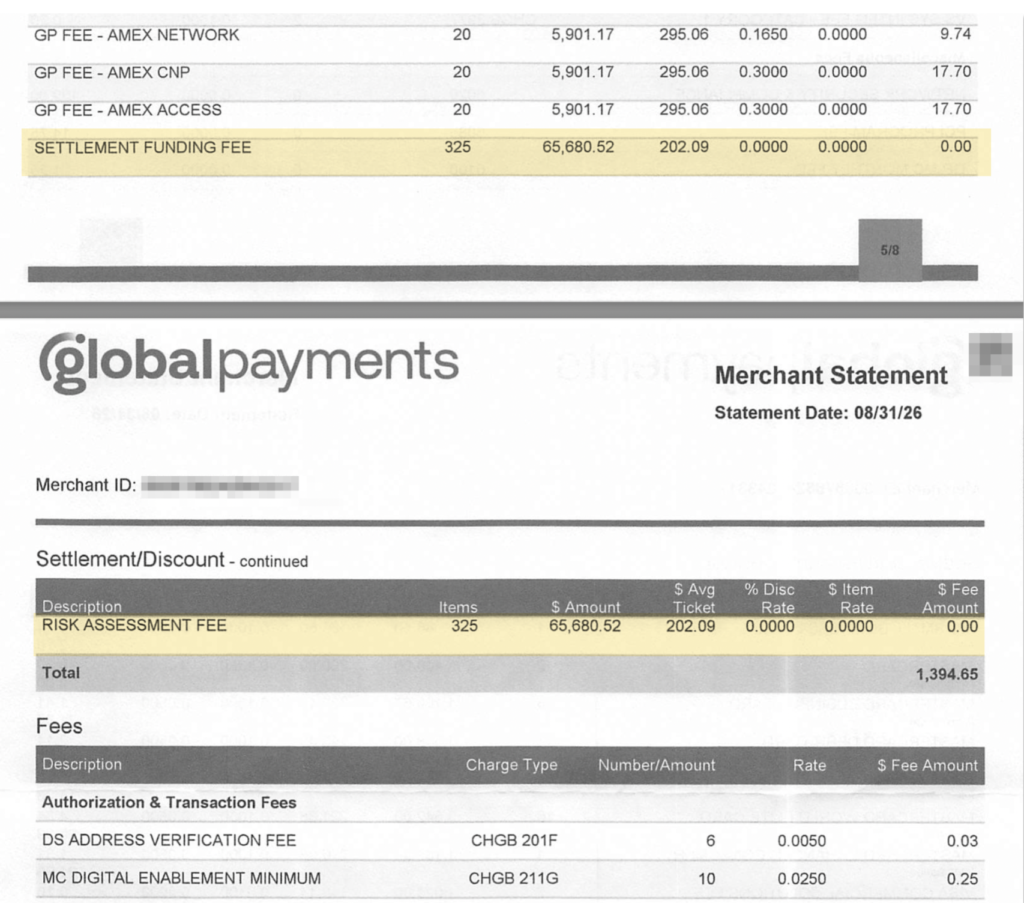
Two fees are highlighted above: Settlement Funding Fee and Risk Assessment Fee.
Both of them:
- Apply to the merchant’s full monthly volume of $65,680.52 across 325 transactions
- Have the percentage rate set at 0.0000
- Are charged a 0.0000 per-item rate
- Result in a total fee amount of $0.00
The math is still being run in the system to calculate what’s owed here. But when the percentage rates and per-item rates are set to zero, the total amount is $0 by default.
On other Global accounts, these fees can range anywhere from 0.05% to over 3%.
So while nothing is being charged to this particular merchant today, both of those fees are already set up on the account. Which means they probably won’t stay at $0 forever.
Why Processors Keep Inactive Fees on Your Statement
There’s no way for us to know what Global’s actual intentions are here. But based on what we’ve seen from them and other processors over the years, a fee that’s already on your statement is a lot easier to turn back on than one that has to be added from scratch.
New fees draw attention. It’s a new line item with a name you’ve never seen before.
Whereas a fee that’s been on your statement for a year at $0 doesn’t draw that kind of attention when the rate changes. The line item looks exactly as it always has, with only a few numbers changing.
And when you’re looking at a statement that’s eight pages long with over a hundred line items, it’s easy to miss a change on a rate that’s always been there.
How a Zero-Dollar Fee Can Quietly Start Costing You Thousands
Processors are generally required to notify you before changing any of your rates or fees. But those notices are often written so broadly, and they don’t always tell you much.
That same Global statement from the August 2026 example from earlier includes this notice attached:
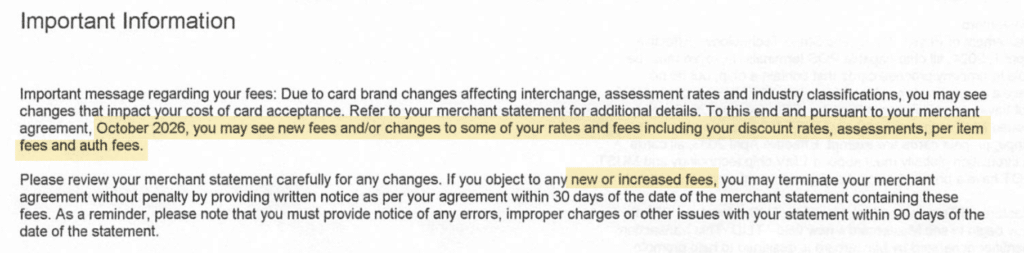
It’s vague, and just says that the merchant “may” see new fees or changes starting in October 2026. But it doesn’t name a single specific fee.
So either the Risk Assessment Fee, Settlement Funding Fee, or both, could easily be impacted just a month after seeing it zeroed out on a statement.
Let’s say that each of these go from 0% to 0.15% (which is honestly on the lower end of the spectrum for what we’ve seen charged on other accounts). That’s an additional 30 bps being charged to this merchant’s volume. At ~$65k per month in card volume, that translates to over $2,300 in additional merchant fees annually.
And that’s a low-volume merchant and a conservative estimate on what those fees could be increased to. At 40 bps each for a merchant doing $500k monthly, that annual cost jumps to $48,000.
Getting a Fee Zeroed Out vs. Removed From Your Account
When you negotiate with your processor, the outcome may not always be what you think it is.
- A fee that’s been removed is gone from your account.
- Whereas a fee that’s been zeroed out is still there, but it doesn’t have a rate attached.
Any processor can zero out a fee instead of removing it. And on your end, the result looks the same because you stopped paying. The difference only shows up later.
Say one of those $0 fees starts getting charged again and you call your processor to dispute it.
The rep pulls your account and tells you the fee has been on your statement for months. Maybe even for years or since you signed up. Which is technically true. It’s been there the whole time.
Now all those $0 line items look like a fee that you saw and accepted. That history becomes part of the processor’s case for keeping the charge in place.
I’m not saying that a fee that’s removed altogether can’t be added back. It definitely can, and we’ve seen that too. But the fees that have been there all along and set to $0 are far more likely to get adjusted first.
Auditing Your Statement for Fees That Were Already There
Most statement audits focus on what you’re paying: new fees that show up, and rate increases on fees you’re already being charged.
But a line item at $0 doesn’t fit either category, which is a blind spot that tends to get skipped.
That becomes a problem once the rate changes because a lot of common internal tracking methods won’t catch it:
- A spreadsheet organized by fee name won’t add a new row when a $0 fee starts getting charged.
- Old statement comparisons make the fee look normal because it was already there.
- Using “Ctrl + F” finds the fee at $0 or $6,000 alike, so finding it alone tells you nothing.
- Asking AI to spot new fees and compare names won’t flag a fee that was already on the statement.
What you need to watch is the rate and dollar amount on every line, not just whether the line item exists. Any fee that moves off $0 or 0% deserves the same scrutiny as a brand new fee.
Better yet, deal with the $0 fees before they have a chance to get changed.
- Ask your processor to remove the fee code from your account entirely.
- Get confirmation in writing.
- If you negotiated a fee down to $0 in the past, check whether it was removed or just zeroed.
- Read every notice on your statement (even the vague ones), and ask your processor to explicitly define changes that will impact your account.
If you’d rather not handle this stuff yourself, our team here at MCC can review your statements and work directly with your current provider on your behalf. You don’t need to switch providers to get junk fees off your account for good.