 by Matt Rej


Payment gateways and virtual terminals are two of the most commonly confused terms in the credit card processing space. And yet they’re very different from each other.
Here are the basics:
- Payment gateways connect the merchant’s point-of-sale (like a website checkout) with financial institutions to process transactions.
- Virtual terminals allow businesses to manually enter customer payment details into a web-based interface, useful for things like phone transactions.
- Gateways are required for online transactions and ecommerce sales, though some modern terminals rely on gateways for in-person processing.
But there’s a lot more to it.
Virtual terminals and gateways have both evolved in recent years, blurring the lines a bit between them.
If you’re unsure whether your business needs a payment gateway, virtual terminal, or potentially both, this guide will help you understand your options.
The Core Difference Between Payment Gateways and Virtual Terminals
As the name implies, payment gateways are tied to infrastructure (hence “gateway”). It’s the technology that sits between your checkout (website, app, or POS system), and the financial institutions that need to approve or deny transactions.
When a customer enters their card number into a checkout screen and clicks the “pay” button, the gateway is what moves that data from your system through the card network, issuing bank, and back again. Without the gateway, online transactions don’t happen.
A virtual terminal is a web-based interface for merchants. Unlike a physical terminal that’s used to process cards in-person, virtual terminals are used by businesses to manually enter a customer’s card details when the card isn’t present.
There’s no customer-facing checkout with a virtual terminal. Cards aren’t being swiped, dipped, or tapped, and the cardholder doesn’t have any access to the virtual terminal that’s being used.
Where They Overlap and Work Together
When you process a transaction through a virtual terminal, a payment gateway is still doing the work behind the scenes.
A virtual terminal is just an interface. It’s where you log in and type the customer’s card details. Once you hit submit, the data gets routed through a payment gateway for authorization. The gateway encrypts the data, sends it to the card network and issuing bank, receives an approval or decline, and then passes the result back.
Virtual terminals handle the input, and the gateway handles the movement.
- Payment gateways are required for virtual terminal transactions.
- But virtual terminals are not used for every transaction that requires a payment gateway.
Modern payment technology has intertwined these two components, and they’re not always sold as two truly separate products. Which is why so many businesses are confused about how they work.
If you log into your Authorize.net account (payment gateway), you’ll find a virtual terminal tab sitting inside the gateway dashboard. Stripe’s interface works similarly. And Square blurs the lines even further by folding in-person, online, and manual payment options into a single unified interface (all relying on a gateway, including in-person transactions).
The result is that many businesses use both tools without fully realizing it. Or they assume they have one when they’re actually relying on both.
This distinction matters more than it might seem, especially when it comes to your costs.
When You Need a Payment Gateway
If your business accepts payments online in any form, you need to have a payment gateway. There’s no workaround.
Common use cases for payment gateways include:
- Ecommerce and online retail: When a customer buys something online through your website, the gateway handles the entire authorization flow.
- Subscriptions and recurring billing: Membership sites, SaaS platforms, and other recurring revenue models use gateways to tokenize card data so customers can be charged automatically without re-entering payment details every time.
- Mobile and app-based payments: Gateways connect mobile transactions to financial infrastructure for things like restaurant delivery apps, hotel booking platforms, or even mobile POS setups for field service payments.
- Software integrated payments: If you’re using an accounting platform, invoicing tool, or industry-specific software (like practice management or CRM) that lets customers pay directly through a digital invoice, you need a gateway.
Again, online payments = gateway required.
When You Need a Virtual Terminal
Virtual terminals exist for a specific scenario: you have a customer’s payment information, but you don’t have their card in front of you and there’s no checkout page for them to use.
This typically happens with:
- Phone orders: A customer calls to place an order and reads you their card number over the phone or mails in a form with their card number written down. Now you need to enter that information into a virtual terminal.
- B2B with non-standard payment flows: If you’re dealing with purchase orders, net terms, and clients who send card details via email or fax, a virtual terminal gives you a simple way to collect payments without building a full online checkout experience.
- Service businesses: Contractors or consultants collecting payments from customers after the fact can call them to collect payment info over the phone, and salons or spas can use virtual terminals to collect deposits prior to the appointments.
- Situations where the customer can’t or won’t use an online checkout: If you have one-off scenarios for large transactions, customers who can’t figure out your online system, or just people who just prefer to call, virtual terminals can give you a fallback option that doesn’t require the customer to interact with any systems on their end.
The common denominator here is that it’s a card-not-present transaction where the customer isn’t actively checking out themselves.
We’ve also seen virtual terminals used in scenarios where a payment processor is down, and a third-party virtual terminal as a temporary workaround until the main systems are back up and running. For example, dentists unable to accept payments during the Rectangle Health outage are using virtual terminals to manually enter card details, even though the card is technically present in their office.
Virtual Terminal vs. Payment Gateway: Side-by-Side Comparison
If you’re still unsure which one applies to your business, or whether you need both, this breakdown should help clarify things.
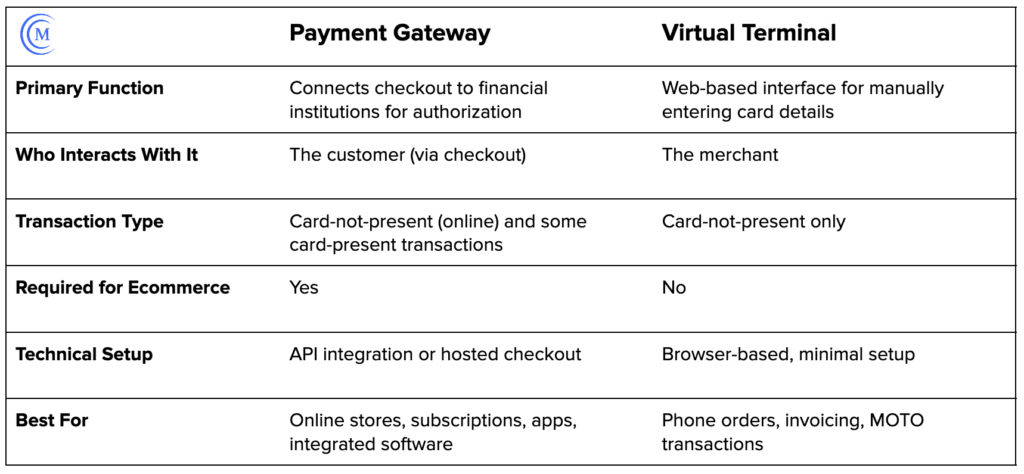
Costs Associated With Payment Gateways and Virtual Terminals
Pricing for both payment tools varies more than most merchants expect, and the differences aren’t always explained well upfront by the providers.
Payment gateways typically carry a monthly fee, ranging from $10 to $30, plus a per-transaction fee that runs anywhere from $0.05 to $0.30 depending on the provider and plan. Some processors roll the gateway fee into their overall pricing and present it as an all-in rate, which can look simpler on the surface but makes it harder to know what you’re paying for the gateway specifically (especially if you don’t need a gateway for every transaction).
Virtual terminal pricing is less consistent. We see processors including virtual terminal access as a standard part of a gateway subscription, so there’s no separate line item. Others charge for monthly access.
The most significant cost factor is on the transaction itself. Card-not-present transactions processed through a virtual terminal carry a higher rate at the interchange level compared to card-present transactions (because CNP is considered riskier).
A bigger issue for most merchants isn’t the gateway or virtual terminal fee. It’s the markup sitting on top of it.
Whether you’re getting this stuff directly from your processor or a third-party provider, processors are always looking for ways to inflate their margins without making it obvious.
So even if your gateway is coming from a third-party provider (that you’re paying for separately), some processors will still sneak gateway charges onto your statements simply because they can and assume you won’t question it.
Do You Need Both a Payment Gateway and a Virtual Terminal?
There are plenty of businesses that need payment gateways and virtual terminals. It’s not always just one or the other.
Here are the most common examples:
- Pure ecommerce: You need a payment gateway. And while a standalone virtual terminal isn’t necessary for the majority of your transactions, your gateway provider may give you access to one regardless, which is useful for the occasional manual transaction.
- Phone-heavy businesses: A virtual terminal will probably be your primary tool. Even if you’re not running an online checkout, a gateway is still used to process virtual terminal transactions behind the scenes.
- Brick-and-mortar retail with online sales: Your in-person setup may not involve a gateway depending on your POS system. But for online orders, you definitely need a gateway, and virtual terminal access is a useful fallback for customers calling the store to place orders.
- B2Bs with mixed payment methods: Both tools can be useful. Gateways will handle any online invoicing or payment portal, while virtual terminals can cover manual entries with some less-standardized client payment arrangements and one-off transactions.
If you’re still unsure, map out all of the ways a customer actually pays you. Then work backwards from there.
Payment Gateway and Virtual Terminal: FAQs
Is a virtual terminal the same as a payment gateway?
No, while they’re closely related, they are not the same. A payment gateway is the infrastructure that moves authorization and transaction data between businesses and banks involved. Virtual terminals are web-based interfaces that merchants use to manually enter card details. But when you process virtual terminal transactions, gateways are still handling the authorization movement behind the scenes.
Can I use a virtual terminal without a payment gateway?
Not really. A gateway is still passing the transaction info through the entities involved when you use a virtual terminal. What you can do is avoid using a separate gateway integration on your website. If you only take phone orders and never need online checkout, you can get virtual terminal access without a fully built gateway integration into your online checkout process.
Do I need a payment gateway for in-person payments?
Not always. It depends on your POS system. Traditional card readers and physical terminals process transactions through their own infrastructure, bypassing the need for a gateway. But many cloud-based POS systems do route transactions through a gateway. Square is a good example of this. It’s worth asking your processor how in-person transactions are actually being routed and whether they’re using a gateway to facilitate things.
Should I get a payment gateway through my processor or third-party provider?
Going through your processor is simpler. But proprietary gateways are designed to keep you locked in to a specific provider. If you use a third-party and switch things down the road, third-party gateways like Auth.net and NMI are processor-agnostic, so you can keep using them without rebuilding the whole checkout integration.
Can my processor charge me for a gateway I’m paying for separately?
Yes, and it happens all the time. If you’re connected through a third-party gateway provider and paying them independently, some processors will still add gateway fees to your statement. This is typically something you can negotiate and remove.
What’s the difference between a hosted payment page and a payment gateway?
A hosted payment page is a checkout form that comes from your gateway or processor. Customers are redirected to enter card details instead of entering them directly on your website. It’s technically a gateway feature, and not a separate product.
Is Stripe a payment gateway or virtual terminal?
Stripe functions as both a payment gateway and a virtual terminal, plus a payment processor. It’s a full-stack platform that includes a gateway with virtual terminal access through one dashboard, with processing under one roof.
Is Square a payment gateway?
Square is better described as an all-in-one payment platform as opposed to a standalone gateway. While a gateway is included, you also get payment processing, a virtual terminal, and POS functionality from one ecosystem. It’s also worth noting that Square’s in-person transactions through traditional terminals are routed through its gateway, which is not the norm for traditional in-person POS systems. But Square does not offer a standalone gateway that you can pair with a separate processor.