 by Matt Rej


After posting about a Fiserv billing error that pulled $350,000 from a merchant’s bank account, I’ve been getting flooded with questions from businesses who essentially all want to know the same thing:
What are you supposed to do if your processor overbills you or charges your merchant fees incorrectly?
(The less obvious errors that aren’t in the six-figure range).
And the honest answer is that it’s both fee and situation-dependent. So I figured I’d put together this guide covering all possible scenarios.
Contact Your Processor Immediately
Most merchant agreements include a window for disputing billing errors, which is often 60 to 90 days from the statement date. So if you find a potential overcharge, it’s not something you should sit on.
Notify your processor in writing ASAP that you’ve identified an error, and confirm they’ve received it so you have a trail.
It helps to include all relevant details (which I’ll cover as we’ll continue), but if a month or two has already passed and you still haven’t put this in writing, it’s best to just get it done immediately with something along the lines of “There is a billing error on my statement dated [whatever that date is].”
You can even allude to the fact that details will follow but you’re notifying them now in accordance with your merchant agreement.
If you just got your statement within the last few days or week and you’re well within the dispute window, you can hold off on the notification until all of your ducks are in a row.
However, it’s worth pulling your last couple months of statements first to confirm the overcharge is limited to your most recent statement and not an ongoing issue that was missed earlier. If that’s the case, the clock is ticking on those statements and you’ll need to notify your processor right away to ensure those errors can be corrected too.
This speaks to the point of why ongoing statement monitoring is so crucial. Just looking at a statement to see your total cost won’t tell you whether you’re being charged correctly. A line-by-line audit is the only way to see this, and it needs to be done every month.
Should You Reverse the ACH Debit Through Your Bank?
I want to get this out of the way early because it was brought up a lot during the Fiserv fiasco.
It’s a natural instinct to go call your bank wanting the charge reversed on an error. But doing so can put you in breach of your merchant agreement and potentially trigger an account closure or funds held in a reserve moving forward.
So no, don’t have your bank reverse the charge. Your processor should make good on the error to ensure you’re made whole. But the last thing you want is other complications on your account.
What you could do is talk to your bank about any safeguards they have in place to prevent some type of overdraw on a recurring debit that’s outside of a typical range.
For example, if your processor normally pulls around $10k or $20k from your account on the 1st of every month, would your bank allow them to pull $200k? What about $60k? Are there any red flags that go up on the bank’s side to prevent an issue that could potentially put your balance in negative territory or restrict your short-term cash flow?
That didn’t happen when Fiserv incorrectly debited $350k from a client, and it probably should have. But that’s a separate conversation with your bank.
Determine Whether the Charge is a Network Fee or Processor Markup
This is important to know because it tells you where the fee came from.
Network fees (interchange and assessments) are supposed to be passed through at cost, meaning no markup added. If they’re coming through at a higher rate it means there’s an error on your processor’s side that was coded incorrectly.
For example, Global Payments incorrectly charged Visa’s Digital Commerce Service assessment after a rate change, and proactively started issuing credit adjustments to affected accounts when the error was found. This went on for three months before anyone caught it.
But not every incorrect network fee is an honest mistake. In rare cases it could mean they’re padding your fees, which means they’re deliberately inflating those costs to earn more margin on your account.
Processor fees cover everything else. Your base discount rate, any per-item or per-transaction fees, authorization fees, monthly service fees, and anything else your processor charges.
Your statement likely has dozens if not hundreds of different line items on it. They should all be grouped into separate categories, but honestly, processors put their markups in the same section as network fees all of the time.
So you can’t rely on the section header alone to determine which category your fee falls into.
Instead, the first thing you should do is compare the fee name against published network rates. This can sometimes be challenging because processors like to use different abbreviations on fee names so you don’t always get a direct match.
It’s worth having a payment professional look at this if you’re unsure about where a fee is coming from. And it’s something we can quickly provide for free here at MCC if you send us a statement.
Is It a Standalone Fee or an Overcharge on Your Entire Card Volume?
Any overcharge is worth fighting, but some are definitely a bigger deal than others.
Let’s say your processor is supposed to be charging you $19.95 per month for some type of PCI compliance service you agreed to. But all of a sudden you start getting charged $35 per month with no notice of an increase.
That’s more of an annoyance than anything else. Whereas if the discount rate that’s applied to every transaction suddenly goes from 0.05% to 0.50%.
Depending on your volume, an error like this could easily result in tens of thousands of dollars wrongfully pulled from your account.
This should be treated as a higher priority scenario. Because not only do you need to get your funds recovered as quickly as possible but you also need to get things corrected on the transactions you’re processing right now.
If you just noticed an error like this on last month’s statement, you’ve already started accepting transactions this month that likely contain the same exact error.
New Charges vs. Existing Fees That Went Up
Both of these happen all of the time.
One month a fee you’ve never seen shows up. Or another month a few you’ve paid for years ticks up and catches you off guard.
Whatever the case might be, and regardless of the amount that’s being charged, the first question should be whether your processor told you about it. And your merchant agreement should detail how much advance notice is required to pricing changes.
But what trips up a lot of merchants is what processors consider notice. It could just be something like a vague sentence buried in a long attachment to your statement.
Here’s an example:
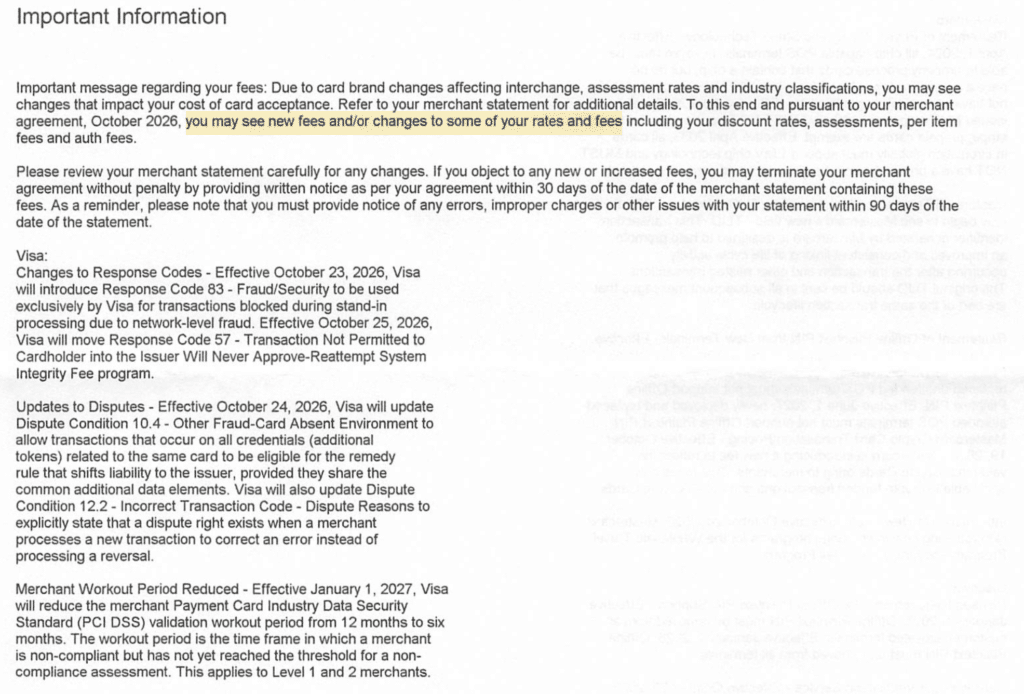
“You may see new fees and/or changes to some of your rates and fees”
That’s your notice. Hard to pick out if it’s not highlighted, in a notice that appears to be mostly about network changes.
If this happens, you can still push back on the increase. But this is more of a negotiation as opposed to a true billing error dispute. Unless of course they increase your rate without any advance notice. Then your position is much stronger.
It’s also worth noting that not every new line item is coming from your processor. Networks add and adjust their own fees, too. Which is why I included the full notice above as a reference.
And charges can also come from a change in the transactions you’re running rather than pricing itself.
For example, let’s say you run a small business in a small suburb that never gets any foot traffic outside of locals. You may never see any international assessments or corresponding interchange rates, until the day someone passing through town with a foreign-issued card visits your business. Those cards carry different cross-border fees from Visa and Mastercard that have never been on your statement before, and they’re real.
But what you’ll want to look for here is whether your processor added its own additional markup on top of these fees. They could be on your pricing agreement somewhere, but if it’s not from the network, it’s fair game to negotiate.
Interchange Downgrades and Wrong Merchant Category Codes
Wrong MCC codes are extremely rare, so I won’t spend a ton of time on this. It’s even rarer if you’ve already had your account up and running for a while, but I’ve seen it happen on new merchant accounts.
If your processor is using the wrong MCC for your business, you could be paying higher interchange rates on every single transaction.
Since this is a setup error you need to push for the code to be corrected and the difference to be refunded. But how far back you can recover will come down the dispute window in your agreement.
Downgrades are a bit different. But where the downgrade comes from matters.
Due to network rules, a transaction can fall into a pricier interchange category like Visa EIRF or Standard rates when data is missing or doesn’t meet requirements for a better rate (keyed transaction, missing AVS, batching late, etc.).
Processor downgrades are another story.
This happens on tiered accounts when your processor downgrades transactions into a non-qualified bucket, carrying the most expensive rate.
I’ve seen this catch merchants off guard because the majority of their transactions always fell under the qualified (cheaper) rate tier. And now suddenly they’re paying a non-qualified rate that could easily be double or triple the qualified amount.
You’ll likely have a harder time fighting these because the processor sets the criteria for each tier, which is largely arbitrary. Unless your account spells out exactly what qualifies and you have the transaction data to prove something should have landed in the qualified bucket, you’re likely out of luck for a refund.
The long-term fix here is getting off tiered pricing and onto an interchange-plus setup. You can do this with your current processor without switching anything else.
Holding Your Processor Accountable to Make Things Right
It goes without saying that you should get your money back due to a billing error. But you should have a say in how you’re made whole.
Processors tend to default to whatever is easiest for them, which is usually a credit on a future statement. And sometimes that’s fine. If you got charged $20 for something that should have been $10, the $10 credit next month isn’t worth losing sleep over.
When the number is bigger, ask for the money back in your bank account. Credits spread over future months leaves your cash with your processor, and it’s on you to confirm each month that it was actually applied.
Refunds might be easier to reconcile on your end. But if it’s a lot of money and you need the cash, the tradeoff is probably worth it.
If they overcharged you by thousands because of their own mistake, or they did something shady like padding your assessments, then you’re owed more than just the overcharged amount. Ask for something else on top of the refund, like:
- A reduction on your markup
- Locking your rates in for a set period
- Waiving your monthly or annual fees
- Going back to your old rate before an increase went into place
- Any other concession that fits your account
One trick that most merchants don’t know about is that you can ask for your processor to retroactively apply new pricing on your account.
Let’s say you had a rate increase that went into effect on July 1st, but didn’t work out a deal somewhere in the middle until September. Part of that new deal can involve the retroactive application of the new rate on your fees from July and August, which can appear on your September statement in the form of a credit.
The point I’m making here is that creative concessions can be made. And the bigger the error your processor makes, the more you should ask them to do to make things right.
Just get it in writing. Because a rep’s word over the phone doesn’t mean much.
Final Thoughts
Billing errors from payment processors happen far more often than most merchants realize. While the $350,000 Fiserv case made headlines for a good reason, the vast majority of you will never have something like that happen to your account.
More common problems are the smaller ones that sit on your statement for a year because nobody looked closely enough to find it.
The fix is simple. Audit your statements line-by-line every month, and have a plan for when you find something.
Moving fast is key because your contract has a tight dispute window. But thoroughness is equally important because a vague complaint is easier for a processor to brush off. And you want to make sure you catch any and all errors on your statement.
Once a billing error has been caught, don’t let them off the hook until it’s been fixed.
If you’re unsure whether something on your account is an error, legitimate charge, or something that can be negotiated, send it over to me or my team and we’ll take a look for free. We’ll also let you know whether your processor’s proposed resolution is fair or whether you’re entitled to more.