 by Matt Rej


If you’re reviewing your monthly merchant statement and can’t seem to find your credit card processing rate anywhere, you may not be overlooking it.
While some processors bury the rate or make it harder to find, sometimes the rate just isn’t listed at all.
You can usually still calculate it manually by locating the right numbers.
But any statement that doesn’t include the rate should be highly scrutinized. The lack of transparency from your processor is troubling. As you should absolutely know what percentage is being paid to them. If they’re omitting something so simple, they may be hiding something else.
Your Credit Card Processing Rate May Not Appear on Your Statement
Take a look at the Activity Summary on this Worldpay statement:
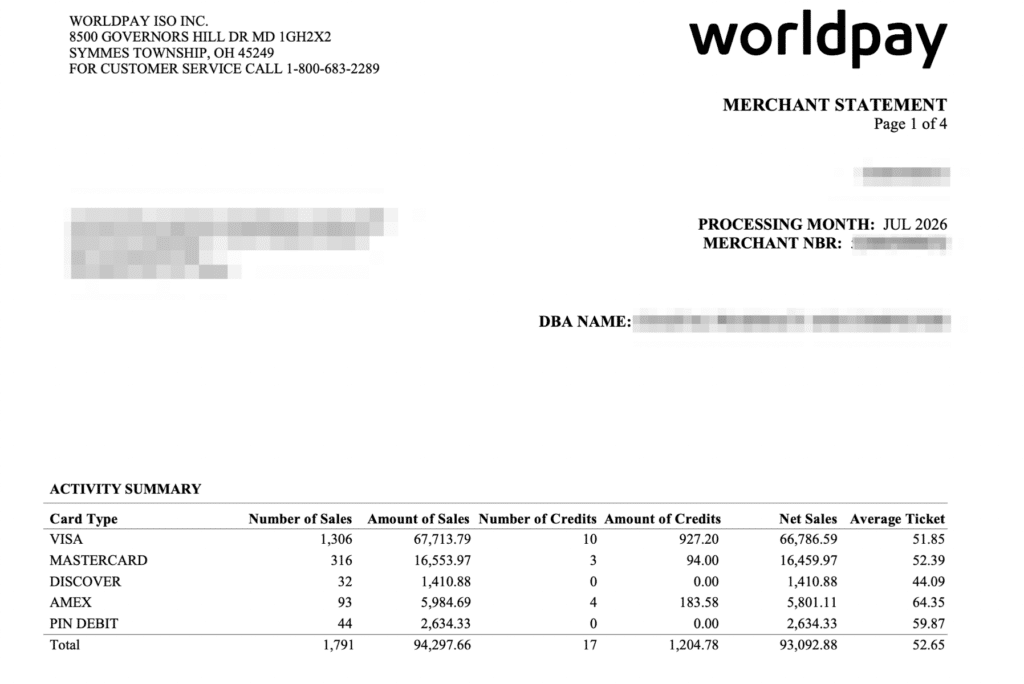
We can see what seems like important information: sales, credits, net sales, and average ticket by card type.
But there’s no processing rate anywhere in this summary.
Rates don’t always appear on page one. Though if we continue to the next page, our problem isn’t immediately solved either:
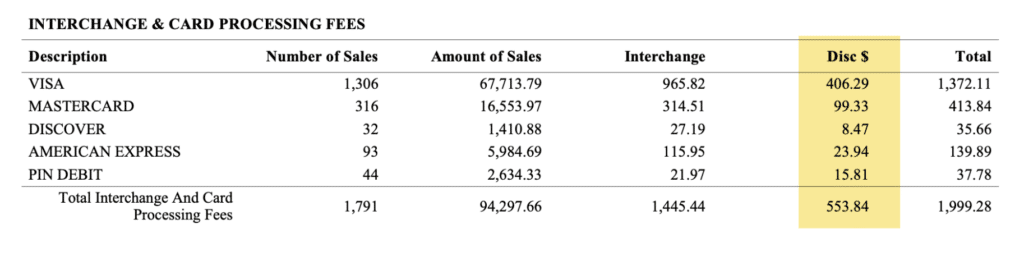
In this table, Worldpay does show you a breakdown of the interchange amount by card type and a Disc $ amount.
The average merchant may not even understand what this shorthand means. Your discount rate is the transaction-based markup that’s paid directly to your credit card processor. It’s an industry term that’s not always fully understood even when it’s transparent.
Here it’s shown as a dollar amount (instead of a percentage) with an abbreviation in the column header (notice how none of the other columns use abbreviations).
But still doesn’t show the corresponding rate being charged.
How to Calculate a Processing Rate That Isn’t Listed
The formula is actually pretty straightforward:
Discount Fees ÷ Sales Volume = Processing Rate
For Visa on this particular statement, the numbers are:
$409.29 ÷ $67,713.79 = 0.006
Then we can convert that decimal into a percentage to find the processing rate is 0.60%.
Running that same calculation for each card type gives us:
- Visa: 0.60%
- Mastercard: 0.60%
- Discover: 0.60%
- American Express: 0.40%
- PIN Debit: 0.60%
There may be a slight difference of a penny due to transaction-level rounding, but the pricing is clear.
This merchant is paying a 0.60% markup on Visa, Mastercard, Discover, and debit, and a 0.40% markup on Amex transactions.
One important detail when you’re doing this math. Make sure to use the Amount of Sales associated with the Discount $ charge. Don’t divide the fees by net sales because credits and refunds can make the calculation inaccurate.
Check the Per-Transaction Fee Separately
Your discount rate doesn’t necessarily represent the entire processor markup. There’s usually a separate fee that you pay per transaction.
Further down on this Worldpay statement, we can see additional fees in the Other Detail section:
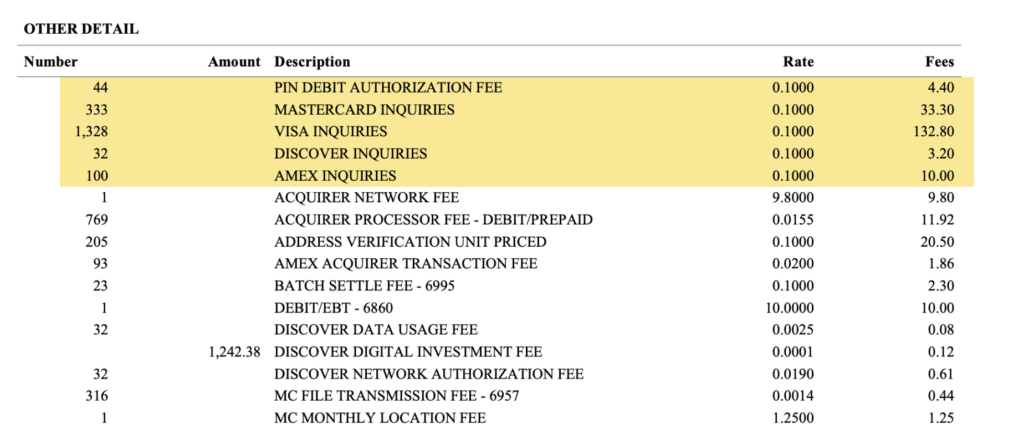
Listed alongside network pass-through fees, we can identify:
- Mastercard Inquiries
- Visa Inquiries
- Discover Inquiries
- Amex Inquiries
- PIN Debit Authorization Fee
These are all charged at $0.10 each.
So the pricing here is effectively the percentage markup plus $0.10 per transaction:
- 0.60% + $0.10 per transaction for Visa, Mastercard, Discover and debit
- 0.40% + $0.10 per transaction for American Express
Be aware that the inquiry amount won’t always exactly match the total sales number because an inquiry could be run on a transaction that isn’t necessarily processed (for example, a declined transaction would still count as an inquiry).
This merchant had 1,306 settled Visa sales and 1,328 Visa inquiries. There were also 316 Mastercard sales but 333 inquiries. And again, that’s just because some authorizations never settle. Which is why those counts can differ.
The Same Processor Can Show Rates Differently Per Merchant Account
Here’s where things get even more interesting (and confusing). Take a look at this Worldpay statement from another client:
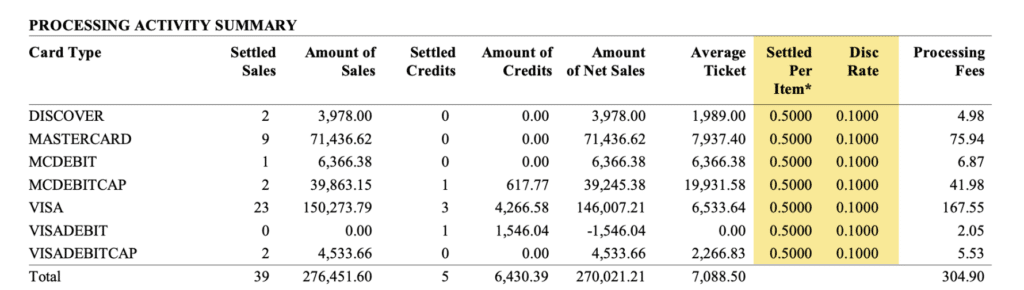
This time, the rate is right there: 0.10% + $0.50 per transaction.
No calculation needed.
The same processor is using a different statement format for another merchant account. So you can audit one Worldpay statement to identify fees one way, but the same approach may not work on another statement if your reporting looks different.
This is just yet another example of why it’s so challenging for merchants to understand what they’re actually paying.
And I don’t mean to pick on Worldpay here. It’s just the example I picked to illustrate this point. But lots of other processors pull similar tricks.
Why would they display such an important column on one statement but omit it from another?
I can’t say for certain, but a logical assumption would be that they’re trying to hide the rate.
It’s easier to raise pricing if the price itself is never listed. And if we look at these two accounts side-by-side, we can see that the transparent discount rate is much cheaper than the one that’s hidden (0.10% vs. 0.60%).
Don’t Confuse the Discount Rate With Your Effective Rate
The 0.60% discount rate we calculated earlier does not tell the full story of this merchant’s total credit card processing costs.
This is just the percentage portion of Worldpay’s credit card processing fee. Separately, the statement includes interchange fees, card brand assessments, authorization fees, network fees, and other miscellaneous costs to the processor.
For the month we audited, the breakdown looks like this:
- Interchange: $1,445.44
- Processing Fees: $553.84
- Assessments: $126.06
- Other Fees: $334.29
- Total Fees: $2,459.63
While this may appear transparent, none of these numbers cleanly represent a total amount being paid directly to the processor.
If we do the math, the effective rate is 2.61% (total fees / total sales).
The rate honestly isn’t that bad at this volume. But putting that aside for a moment, it’s crazy that the two most important numbers (discount rate and effective rate) aren’t printed anywhere on the statement.
Final Thoughts
If you can’t locate the processing rate on your statement, there’s a chance your processor chose not to include it.
When this happens, you’ll need to manually calculate it to ensure the rate aligns with what you think you’re supposed to be paying.
And if you think your processor is overcharging you or trying to hide something in your statement, it helps to bring in an outside perspective.
That’s exactly what we do here at Merchant Cost Consulting.
We analyze merchant statements to separate processor markups from the mandatory pass-through fees to determine if you’re actually getting a good deal. More often than not, there’s plenty of room to negotiate a lower rate without changing anything.